Bluetooth music on my Giulietta's original radio
In the car since 1 October 2026 · written 3 October 2026, updated 12 October 2026
My 2011 Alfa Romeo Giulietta 2.0 JTDm could handle Bluetooth phone calls, but it could not play music from my phone. That was the one thing I wanted to add.
I had a few options:
- An adapter on the CD-changer input.
- A Bluetooth adapter on the AUX (3.5 mm) and USB sockets.
- An aftermarket media unit, usually Chinese, that replaces the whole radio.
I went with the AUX Bluetooth adapter and used it for more than five years. It played music, but the steering-wheel buttons could not control it, and staying on AUX meant losing calls through the car's own Bluetooth. Then the original Blue&Me module broke, and the AUX setup stopped working too. I had lost even the workaround I had been using.
What made a replacement seem possible was fmntf's series of articles on Medium and his fiatcan project. He had done the hard work on another Fiat-group car and explained it. With that starting point, and LLMs available to help with the work, I decided to build my own replacement.
I wanted to keep the original radio, control Bluetooth music from the steering wheel, and make calls with the car's own microphone. All of it working together.

The idea
The place to start was the Blue&Me box behind the dashboard. That was what connected my phone to the radio for calls. Mine was broken, so I already had a module to replace.
I built the replacement with a Raspberry Pi Zero W and fitted it in the original module's case. My phone connects to this small computer over Bluetooth for music and calls. The car recognises it as Blue&Me, so I can select that source on the radio and use the steering-wheel buttons. The sound reaches the radio through the original audio wires. I did not use a CD-changer emulator or an AUX adapter.
What works in my car now
- Music over Bluetooth
- I press MEDIA and my phone plays through the car's speakers. When I go back to FM, the phone pauses.
- Steering-wheel control
- Next and previous track from the wheel. The volume buttons work as they always did.
- The track on the display
- Artist and title on the radio's display, with the elapsed time below.
- Hands-free calls
- I hear calls through the speakers and use the roof microphone. I can answer and hang up from the wheel. The other person still hears a slight echo.
- The phone's assistant
- The wheel's voice button opens my phone's assistant. I speak through the car's mic and hear the answer through its speakers.
- Clean sound
- I tested it up to full volume with the engine running and heard no distortion or engine whine.
- Nothing to switch on
- It wakes when the car is unlocked and the phone reconnects by itself within seconds. Parked, it sleeps.
- No warning lights
- The car accepts it as the original part. The odometer, which blinks when a module is missing, stays steady.
What it takes
I used small electronic modules, a soldering iron and a multimeter, with a 3D printer for the housing. Most of the work was moving between measurements at the bench and recordings from the car. The guide has the complete parts and tools list.
The difficult part was getting the radio to accept the replacement. It would only open its audio input for a module it recognised. Before I could enjoy the music, I had to understand what the car expected that module to do.
Getting the radio to accept it
The audio and the control messages turned out to be separate jobs. The sound travels down the original analog wires. CAN carries the requests around it: whether the module is present, which source the radio wants and which button I pressed. Playing sound from the Pi would not help until the radio agreed to listen.
I did not have a working Blue&Me to copy. I first recorded the car without it, then changed the configuration so the car expected it and recorded again. The difference showed the requests for the missing module. Later I plugged the broken module back in: it could no longer do its job, but the messages it still sent gave me more of the protocol.
The first useful result was not music. It was the car accepting the Pi and the odometer staying steady. Getting the radio source to stay selected was another test. An audio-ready message sent on its own was ignored; it had to be an answer to the radio’s request. I also had to filter the incoming traffic so the small Pi could reply in time.
That changed how I worked. A matching message from another Fiat-group car was a starting point; a recording from mine was what let me trust it. I kept those references with the software so I could trace each transmitted message back to the test that supported it.

Music was easier than calls
I could work on the audio at home while the CAN side was still unfinished. A USB sound card gave the Pi the output and microphone input it lacked. Music through headphones was straightforward. Calls needed more work: both directions had to stay connected, and the microphone audio could not be allowed to build up into a delay.
The tests exposed things that a successful music connection had hidden. My first microphone pipeline kept old audio between calls. A player that handled both music and calls did not return to music afterwards. I separated the players and replaced the pipeline with a relay. Wideband Bluetooth calls then made quiet speech easier to hear.
The roof microphone needed its own circuit; it was not a headset mic I could simply plug in. I measured its supply and recorded myself speaking and whistling before making a call. Hearing from the other person that it sounded good mattered more than the measurements alone. In the car I also compared the music level with FM and listened with the engine running. I heard no whine, so I did not add an isolator.
Making it feel like the original system
I wanted to stop using the phone to manage the music. The wheel buttons were already visible in the recordings, but knowing which bit changed was only the beginning. The same button can mean something different during a call. The application checks the phone’s call state before choosing what to do.
The radio also keeps some control for itself. I learned that from testing mute and source changes in the car, rather than assuming the Pi should handle every button. The display took its own experiments: I had to work out which text field appeared on each line and which characters the radio could show. I ended up with scrolling artist and title above the elapsed time.
The first installation exposed the power problem
The replacement was installed on 1 October 2026. It worked, then the first crank reset the Pi. Adding a diode and a capacitor did not fix it. On the bench, the converter lost its output at an input voltage where its label said it should still work. Replacing it stopped the resets. The original bench test had proved that it could power the Pi, but not that it could survive starting the engine.
Parking brought a different constraint. The car checks for its modules almost as soon as it wakes, before I turn the key. A cold Pi takes too long to answer. I chose to keep it in a reduced-power standby for 72 hours, then halt it. That lets it answer immediately during ordinary use, while setting a limit on the parked consumption. It still draws power when halted, so I disconnect it before a long absence.
Fitting it into the old case
Reusing the original case meant I could keep the factory mounting and plug. The space inside was less simple than it looked from outside: ribs, clips and posts all got in the way. I used photos and measurements to design a frame and tray in OpenSCAD, then tried thin printed templates before making the full parts.

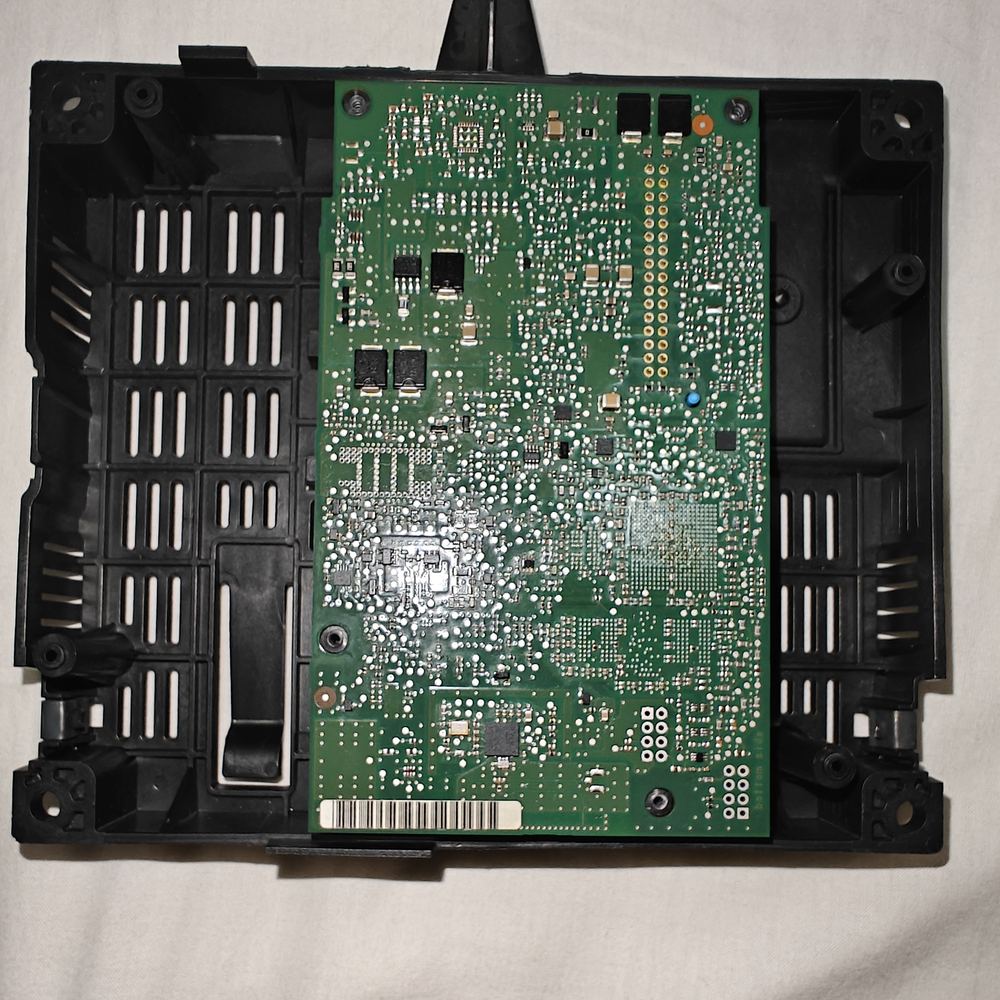
The first full tray still had problems the model had missed. The sound card’s cable hit a post, and the USB adapter stretched across the CAN board. I moved the post and shortened the cable, soldering it directly to the Pi. The connector also took several attempts before I settled on header pins held by perfboard. The fitting and wiring details are in the guide; these were the changes that made the assembled unit fit.


Fixing the gaps in the music
After installation, the music developed small gaps. The CPU was not fully occupied and the sound card reported no underruns, but Bluetooth was losing packets. The Zero W shares its radio between Wi-Fi and Bluetooth, and I was connected to my phone’s hotspot. Turning Wi-Fi off stopped the losses; turning it back on brought them back.
I made that part of normal operation: Wi-Fi stays off during audio and returns after it stops. It means waiting to use SSH, but I no longer need to switch the network manually every time I want music. This was another problem that only appeared when the bench setup became a car installation.
A noise in the calls
The first call after the unit went into its case went badly. The other person heard a deep noise, like an engine, and not my voice. I took the unit home and recorded the microphone input on the bench with nothing connected to it. The noise was there too. It stayed when I ran the Pi from a power bank, and it disappeared when I pulled the microphone plug out of the sound card.
That pointed at the wiring around the plug, and a multimeter found two ground faults. The microphone plug's ground did not reach the board's common ground. And the sound card's own ground sat above the Pi's: 60–80 mV with the microphone plug pulled out, 30–38 mV with it plugged in. The cause was the USB cable I had shortened and soldered to fit the case. I joined the first and soldered a short wire for the second. With the plug in, the difference fell to 4.5 mV. With the microphone input's two wires joined, the noise was then close to the level I had measured in the car with the breadboard circuit, where the microphone was connected. The two are not the same test. Both faults came with the soldering: on the breadboard, where I had tested the calls, neither existed.
With the unit back in the car and fully installed, the calls work again. I tested that on 11 October 2026. The other person hears a slight echo, and I will deal with that later.
Still open
- The slight echo the other person hears in calls. The Pi does no echo cancellation yet.
- Answering a WhatsApp call from the wheel. The wheel button answers a normal call, but not a WhatsApp call yet.
- What the car does when the Pi answers PROXI late, after a parking longer than 72 hours.
- A read-only root filesystem. The card has come through the power cuts so far, which is not the same as being safe.
- The glovebox USB socket. The module powered it, so it probably has no power for now. I have not measured it.
Building your own
The result is the radio I wanted to keep, with music, calls and the controls working together. It was built and measured on my car; another installation needs its own checks. If you want to make one, the implementation guide starts with the parts, then follows the bench tests, car recordings, wiring and permanent installation. That is where I have put the commands, diagrams and measurements.