From broken hardware to music and calls in the car
I replaced the broken Magneti Marelli Blue&Me module (50521871) with a Raspberry Pi Zero W. It responds to the Body Computer, reads the steering-wheel buttons, plays Bluetooth music and handles phone calls through the original radio and the car's own microphone.
- 3.3 V rail
- 5 V rail
- Ground
- Hazard
01 Read this first
In the previous post I explained what this project is and why I built it. In this guide I explain how I did it, in fifteen steps from the first checks to music and calls in the car.
The measurements come from my hardware and my car. Another car may give different results. That is why I started with measurements and recordings before transmitting messages or making further connections.
The software is on GitHub: github.com/crimeofheart/giulietta-blue-me.
Listening first
I could not find published CAN information for the Giulietta 940. I started from fmntf/fiatcan for the Fiat Doblò 263 and karolkrupa/alfa-blue-me for the Alfa 159. But they describe other cars and differ on many message identifiers. I compared the messages with recordings from my own car. Each message in the software's tables has a reference to its recording, and the transmit gate only allows messages supported by those recordings.
A fresh install is listen-only, in two layers: the CAN controller is in listen-only mode, and the application's list of frames it may send is empty. Wired to a live car it receives and decodes, and cannot transmit. Transmitting is switched on in step 12, by a command, and switched off by the same command.
Why the usual approach is unavailable
At the start, I did not have a working module to record, and the car was configured without Blue&Me. So I recorded the car twice: first as it was, then after telling the Body Computer to expect a Blue&Me module. Comparing those recordings with blueandme-diff showed what the car was looking for (step 10). Later, the broken module's remaining traffic gave me more frame IDs, as I describe in the post.
The PROXI value comes from the car being fitted, not from my build. It is the six bytes the modules send when the Body Computer asks. I left mine out of the published code, which reads the value from a setting instead. Step 10 shows how it is read from a recording; step 12 shows where it goes in the Pi's configuration.
Legend used throughout: bench cannot affect the car · car touches the vehicle bus. Steps 1–6 are bench work. Step 7 is the first contact, listen-only. Step 12 is the first time the Pi transmits anything.
Required components
Sorted from what you cannot do without to what you can skip. Tools come last.
| Component | Qty | Notes |
|---|---|---|
| Crucial | ||
| Raspberry Pi Zero W, with its 40-pin header | 1 | Bluetooth and Wi-Fi on board, one core, about 1 W. Not the Zero without W. |
| microSD card, 16 GB or more | 1 | For Raspberry Pi OS Lite, 32-bit (step 3). 16 GB is the minimum Raspberry Pi recommends for the Lite image. Mine is a SanDisk 64 GB. |
| MCP2515 + TJA1050 CAN module | 1 | The common blue board. Note its crystal, 8 or 16 MHz. Needs two modifications (steps 1–2). An SN65HVD230 board avoids them. |
| USB sound card with audio output and microphone input | 1 | Any card that Linux detects as a USB audio device should work, C-Media based or not. Mine is a Ugreen USB-A adapter with a C-Media HS-100B: stereo out, mono microphone in. Two things to check on another card: its headphone sleeve must be a true ground, and its name in aplay -l (step 13). The microphone input matters only for calls. |
| 3.5 mm stereo cable | 1 | From the card's headphone jack to the radio's audio pins (step 14). |
| 12 V to 5 V buck converter, USB output | 1 | Mine is a TECNOIOT 6–24 V to 5 V USB step-down module. The Pi draws up to about 0.3 A. The converter must hold its output while the engine cranks: test it on a bench supply first (step 15). |
| Header pins, 2.54 mm, 0.64 mm square | 32 | Four strips of eight. They fit the car's plug directly. |
| Perfboard strip, 2 × 16 holes with a 5 mm frame | 1 | Cut from a piece of perfboard. It holds the 32 pins and is the connector to the car's plug (step 15). |
| Hook-up wire, heat-shrink, glue | Thin wire for the 5 V modification in step 2. | |
| Recommended | ||
| Electrolytic capacitor, 2200 µF, 35 V or more | 1 | Crank hold-up, across the buck's input (step 15). |
| Diode, 1N5822 or 1N4007 | 1 | Crank hold-up, between pin 16 and the capacitor. |
| PN2222 transistor | 1 | Ignition wake: the key restarts the Pi after a parking longer than three days. Without it, pull and refit fuse F36. |
| Diode, 1N4007 | 1 | Ignition wake, across base and emitter. |
| Resistor, 100 kΩ | 2 | Ignition wake. |
| Perfboard, 3 × 7 cm | 1 | 10 × 24 holes, 2.54 mm. Carries the crank hold-up and the ignition wake. |
| The original Blue&Me case | 1 | The broken module's own. It fits the factory bracket and Bluetooth passes through its plastic. |
| Printed sled: frame and tray | 1 | PETG or ASA. PLA softens in a parked car. |
| M3 screws and standoffs, cable ties | 4 mm standoffs under the CAN module, 5 mm under the Pi. Ties hold the buck and the sound card. | |
| Optional: hands-free calls | ||
| 3.5 mm cable | 1 | From the microphone circuit into the card's microphone jack. |
| Resistor, 2 kΩ | 1 | Microphone feed. |
| Resistor, 1 kΩ | 2 | One beside the 2 kΩ in the feed, one in the divider. |
| Resistor, 10 kΩ | 1 | Microphone divider. |
| Electrolytic capacitor, 10 µF, 10 V or more | 1 | Keeps the microphone's DC off the card. |
| Optional: convenience | ||
| Micro-USB OTG adapter | 1 | For the bench. In the case the card is soldered to the Pi (step 15). |
| Ceramic capacitor, 100 nF | 1 | Only if the CAN transceiver has none at its supply (step 2). |
| Tools | ||
| Multimeter, soldering iron, scalpel | Crucial. The meter is the important one. | |
| A phone | 1 | Crucial. The one that will play the music. |
| USB power bank | 1 | Crucial. Powers the Pi for all work at the car until step 15. |
| OBD adapter and MultiEcuScan on a Windows tablet | 1 | Crucial for the alignment in step 10. |
| Adjustable bench supply | 1 | Recommended. To sweep the buck converter before it goes in the car. |
| 3D printer | 1 | Optional. For the sled and its test sheets. |
02 Bench build steps 1–6
Step 1 — Identify your MCP2515 module
Two facts to establish before anything is wired.
a) Crystal frequency
I started with the crystal marking on the CAN board: 8.000 means 8 MHz, 16.000 means 16 MHz. A well-lit close-up helps if the marking is hard to read. This value has to be right in the installer; otherwise the bus will look silent later, even with the wiring correct.
b) Terminating resistor
With nothing connected, measure resistance between the CAN-H and CAN-L screw terminals with a multimeter.
- ~120 Ω → there is a terminator on the board. Remove
it. On the common blue MCP2515+TJA1050 board it sits directly between
the two terminals, silkscreened
120Rand marked121. Desolder it, or lift one leg. - Tens of kΩ → no terminator. This is the pass, and it is not an open circuit: the TJA1050's own differential input resistance stays across the pins permanently, roughly 20–100 kΩ. With the transceiver fitted you will never read infinity, so do not go hunting for a resistor that is not there.
The car's B-CAN is already terminated at both ends. Adding a third terminator lowers the differential impedance and can stop the bus working for every module on it, not just yours. Two builders before me hit exactly this: karolkrupa on the Alfa 159 and a fiatcan user on the Doblò. Note the contrast with fmntf, who added a 120 Ω jumper: he was probing a single isolated ECU on a bench, where nothing else terminates the bus. Bench and car want opposite things here.
Established for this build
| Value | Consequence | |
|---|---|---|
| Crystal | 8 MHz | install.sh --oscillator 8000000 |
| Terminator (121, 120 Ω) | desoldered | CAN-H↔CAN-L then read 45 kΩ — transceiver only, terminator gone |
You know the crystal frequency, and CAN-H↔CAN-L reads far above 120 Ω — tens of kΩ is correct, a true open circuit is not expected.
Step 2 — Solve the 5 V problem
The board has a single VCC pin feeding both chips. That is the whole
problem.
The TJA1050 transceiver needs 5 V to drive a CAN bus — it is specified for
4.75–5.25 V and has no 3.3 V mode. So the board gets fed 5 V, the MCP2515
controller runs at 5 V too, and a chip running at 5 V drives its outputs to 5 V.
One of those outputs is MISO, and MISO goes straight
into the Pi's GPIO9, which is not 5 V tolerant and has no
clamping diodes.
MISO. The SPI wiring,
the transceiver's 5 V supply and the CAN side all stay as they were.Over-voltage on a GPIO may not fail immediately or visibly. It can leak current through the input's protection structures and damage the pin over time. A module that has run fine for an hour proves nothing. Do the modification before the first power-up.
Three ways out
Split the rails
Cut the copper track between the board's VCC pin and the TJA1050, then solder a wire to feed the transceiver 5 V separately.
One cut, one wire, no extra parts.
Level shifter on MISO
Leave the board at 5 V and put a 3.3 V/5 V shifter on the MISO
line only — the one line driving toward the Pi.
No board surgery, but an extra part and three more joints in the SPI path.
Buy a 3.3 V board
An SN65HVD230-based module runs natively at 3.3 V, controller and transceiver both.
Nothing to modify at all. Cheap. If cutting the board does not appeal, buy this instead.
Only MISO strictly matters. MOSI, SCK
and CS are Pi outputs and MCP2515 inputs — the Pi drives 3.3 V into a
5 V chip, which reads it happily as a logic high. MISO and
INT are the two lines pointing the other way, and INT is
open-drain. That is why Option B works on MISO alone. Splitting the
rails fixes all of them at once.
What "cut the trace" actually means
A trace is a printed copper track on the surface of the circuit board. It does the job of a wire: it is flat, a fraction of a millimetre wide, glued to the board, and covered by the green lacquer you can see (the solder mask). Every connection on the module is one of these.
Cutting it means physically severing that copper with a sharp blade so current can no longer flow along it — you scrape a small gap across the track, right through to the bare fibreglass underneath. It is not cutting the board itself, and nothing is bent or removed; you are making a deliberate break in one connection, roughly a millimetre wide, in a track thinner than a pencil line.
Once broken, the two ends are electrically separate. You then solder a wire to one of those ends and feed it from somewhere else. That is the entire modification: break one connection, then re-feed one side of it.
Finding the right track without guessing
I located the track with the meter rather than relying on a board drawing. The same check works even when a module's layout differs from mine. With the meter on continuity, the sequence is:
- Put one probe on the board's
VCCheader pin and leave it there. - Touch the other probe to each pin of the TJA1050 (the small 8-pin chip nearest the CAN screw terminals) until it beeps. That pin is its supply — pin 3 in the TJA1050's datasheet.
- Do the same on the MCP2515 (the larger chip) to find its supply pin. Note both.
- The copper running between the
VCCpin and the TJA1050's supply pin is what you are cutting. Follow it by eye.
Now you know the two pins that must end up separated, and you can prove it afterwards rather than hoping.
Cut the transceiver side, not the controller side
Both directions give the same split rail. But leaving the header pin attached to the MCP2515 means the pin your jumper wire plugs into is the 3.3 V one — harder to get backwards later, and it matches every published write-up.
There may be a small capacitor across the TJA1050's supply. It must stay with the transceiver, on the 5 V side of the cut. If the board has no capacitor there, solder a 100 nF between the transceiver's supply pin and ground once you are done.
What you need
- Fine-tipped soldering iron and thin solder
- Scalpel or hobby knife for the cut
- Multimeter with continuity beep the important one
- Thin insulated wire 28–30 AWG, ~60 mm
- 100 nF ceramic capacitor only if there isn't one already
- Magnifier or phone camera to find the track and check the cut
Photograph the board first
Close up, well lit, before you touch anything. If you lose track of which side is which mid-cut, that photo is the only way back.
Scrape through the copper
Scratch away the green lacquer across the track, then cut the copper beneath it. Two or three light passes with the blade held across the track, not along it. Aim for a gap about a millimetre wide, down to bare board.
Light passes beat one heavy pass that gouges the board or slips into a neighbouring track.
Prove the cut with the meter
VCCheader pin to TJA1050 supply pin: must now read open, no beep.VCCheader pin to MCP2515 supply pin: must still beep. If either is the wrong way round, stop and re-read the board.Solder the 5 V wire
Tin the exposed copper on the TJA1050 side of the gap and solder your wire to it. Keep it short, and anchor it with hot glue or tape — a wire that works loose in a car will take the pad with it.
Check for shorts before applying power
The two supply pins must now be independent of each other, and neither should be shorted to ground. Only then connect anything to the Pi.
121 is what you already desoldered in step 1.MISO cannot present more than 3.3 V to the Pi. With the module powered and the Pi disconnected, the MCP2515's supply pin measures 3.3 V and the TJA1050's measures 5 V.
Step 3 — Flash the SD card
Use Raspberry Pi Imager on your dev machine.
- OS: Raspberry Pi OS Lite (32-bit). Not the desktop version. 32-bit is required — the Zero W is ARMv6.
- Open "Edit Settings" and set: hostname
blueandme; SSH enabled (key or password); username and password; Wi-Fi SSID, password and country.
Boot the Pi from USB power with nothing else connected and wait about two minutes,
then ssh <user>@blueandme.local.
You have an SSH shell on the Pi.
Step 4 — Install
# on your dev machine
git clone https://github.com/crimeofheart/giulietta-blue-me
cd giulietta-blue-me
rsync -a --exclude .git --exclude .venv ./ <user>@blueandme.local:~/giulietta-blue-me/

# on the Pi
cd ~/giulietta-blue-me
sudo ./install.sh --dry-run --oscillator 8000000     # read what it will do
sudo ./install.sh --oscillator 8000000               # 8 MHz, confirmed in step 1
sudo reboot
First run takes a while on a Zero W — the apt step is the slow part. On an OS
release with no prebuilt package in packages/, it also compiles
bluez-alsa for wideband calls, about ten more minutes (step 13). And it trims
boot for a headless car unit: no initramfs, no display or camera drivers, none of
the modem, disk or keyboard services, and the CAN and Bluetooth drivers loaded
first (times in step 15). Run again on a working Pi, it takes about two minutes: it
skips apt when every package is there and reinstalls only the application.
install.sh ends with "configuration is valid".
Step 5 — Wire the MCP2515 to the Pi
Power the Pi off first (sudo poweroff, wait for the LED to stop).
Find pin 1 before you count anything
Every number below is a physical pin position, and they are only meaningful once you know which end of the header is pin 1. Three ways to find it, in order of reliability:
- The square pad. Pin 1 is the only square pad on the board; all thirty-nine others are round. If the header is already soldered on, turn the board over and look at the solder joints from underneath.
- The
J8silkscreen outline. Pin 1 is the corner inside it nearest the microSD card slot. - The card slot itself. Pin 1 is at that end of the header, never
the far end where the
RUNpads and the second mounting hole are.
From there, numbering advances in pairs along the header, away from the card slot: 1 and 2 at the corner, then 3 and 4, then 5 and 6. Odd numbers stay in the row nearer the card slot; even numbers in the row nearer the board's outer edge.
J8. Every
other pad is round. If your header is already soldered on, turn the board over —
the square pad shows from underneath.| Module | Pi signal | Physical pin | Notes |
|---|---|---|---|
| VCC (MCP2515, after the cut) | 3.3 V | 1 | Feeds the controller only |
| TJA1050 supply — your added wire | 5 V | 4 | Pin 2 is equivalent |
| GND | GND | 39 | One ground is enough; any ground pin works. On this build pin 6 carries the car's ground (step 7) |
| CS | GPIO8 / CE0 | 24 | Matches spi0-0 in the overlay |
| MOSI | GPIO10 | 19 | Pi drives, module listens |
| MISO | GPIO9 | 21 | The line the modification exists for |
| SCK | GPIO11 | 23 | Clock |
| INT | GPIO25 | 22 | Must match interrupt=25 in the overlay |
MOSI and MISO swapped. It does no damage, it just
produces a bus that never initialises — and it looks identical to a wrong
crystal value. Check twice now rather than debugging it later.
Power up and check:
blueandme-statusExpect interface present ok, link state UP,
bitrate 50000, bus errors 0, spidev present ok.
If can0 does not exist:
dmesg | grep -i -E "mcp251|spi"      # driver probe failures show here
ls /dev/spidev*                       # SPI enabled?
grep -E "spi|mcp2515" /boot/firmware/config.txt
mcp251x spi0.0: MCP2515 successfully initialized is what you want.
Cannot initialize MCP2515 points to the wiring or to a wrong
oscillator value.
blueandme-status shows can0 up at 50000 with zero errors.
Step 6 — Prove the software works, with no car
Everything can be exercised over a virtual CAN interface before the car is involved.
sudo modprobe vcan
sudo ip link add dev vcan0 type vcan && sudo ip link set up vcan0
tests/fixtures/fetch.sh               # once: the Doblò recordings some tests read
python3 -m pytest                     # the vcan0 tests now run too
blueandme-protocol-map # the profile tables, generated from codeFull suite green, and the protocol map prints the Giulietta profile's frames.
03 In the car steps 7–10
Power the Pi from a USB power bank for all capture work. Do not connect vehicle 12 V to the Pi. Do not connect the Pi's USB to the car. If you are driving it from a tablet, keep that on its own battery too — a tablet charging from the car while tethered to the Pi creates exactly the ground path the power bank exists to avoid.
Step 7 — First contact: listen only
Two connectors in my car matter, and they are for two different machines. Do not confuse them.

What you are looking for
The harness-side plug is the half that stays in the car: a blue housing with a black locking lever, the loom entering from the back and two rows of small square cavities on the mating face. Since the original module was removed it is vacant and hanging loose, which is what makes this tap possible without cutting into the loom.
The photographs identify the two connectors and their moulded numbers. They do NOT tell you what each pin carries: that is the map below. The two photos were not taken the same way up, so compare the moulded numbers, not the positions.
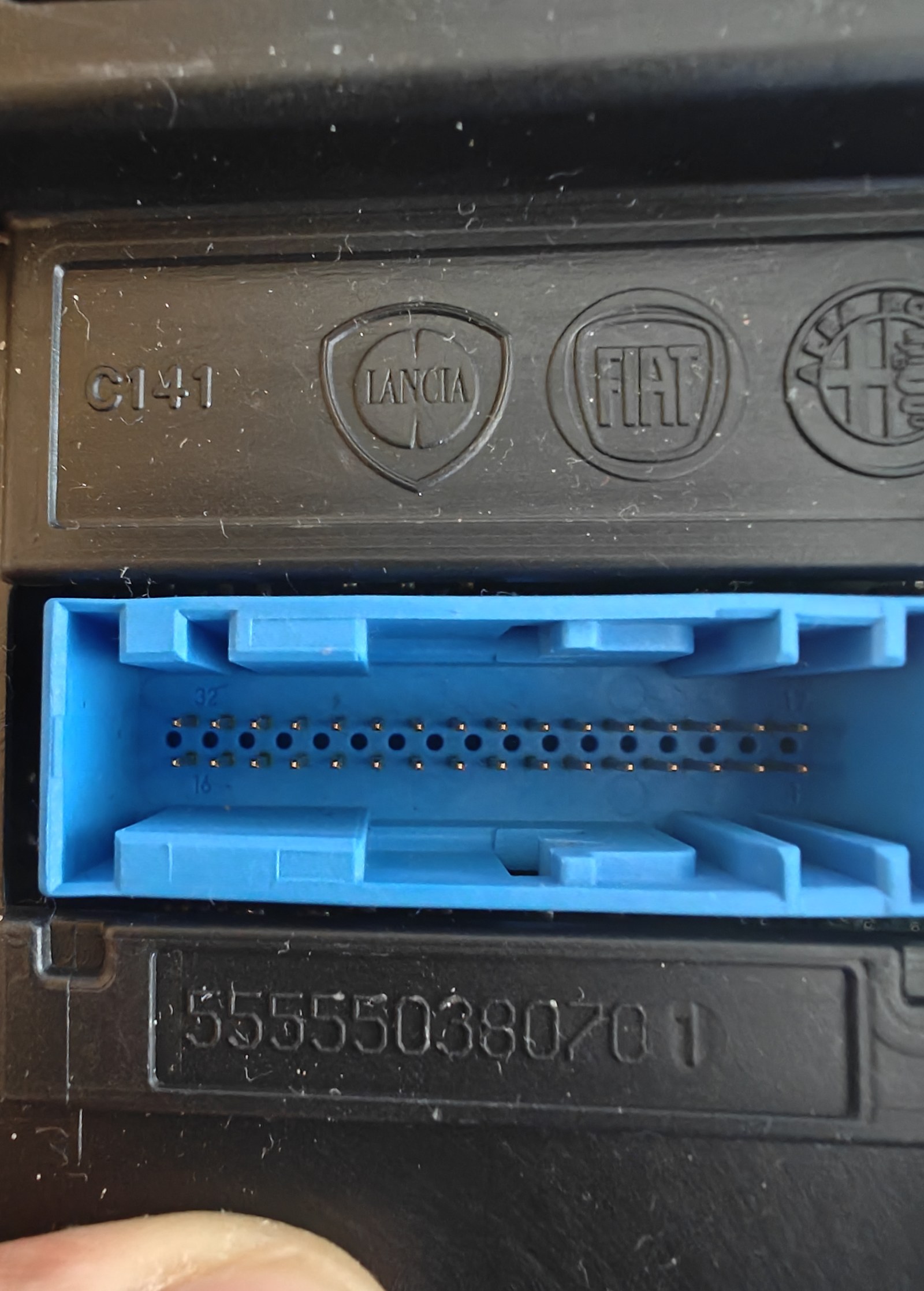
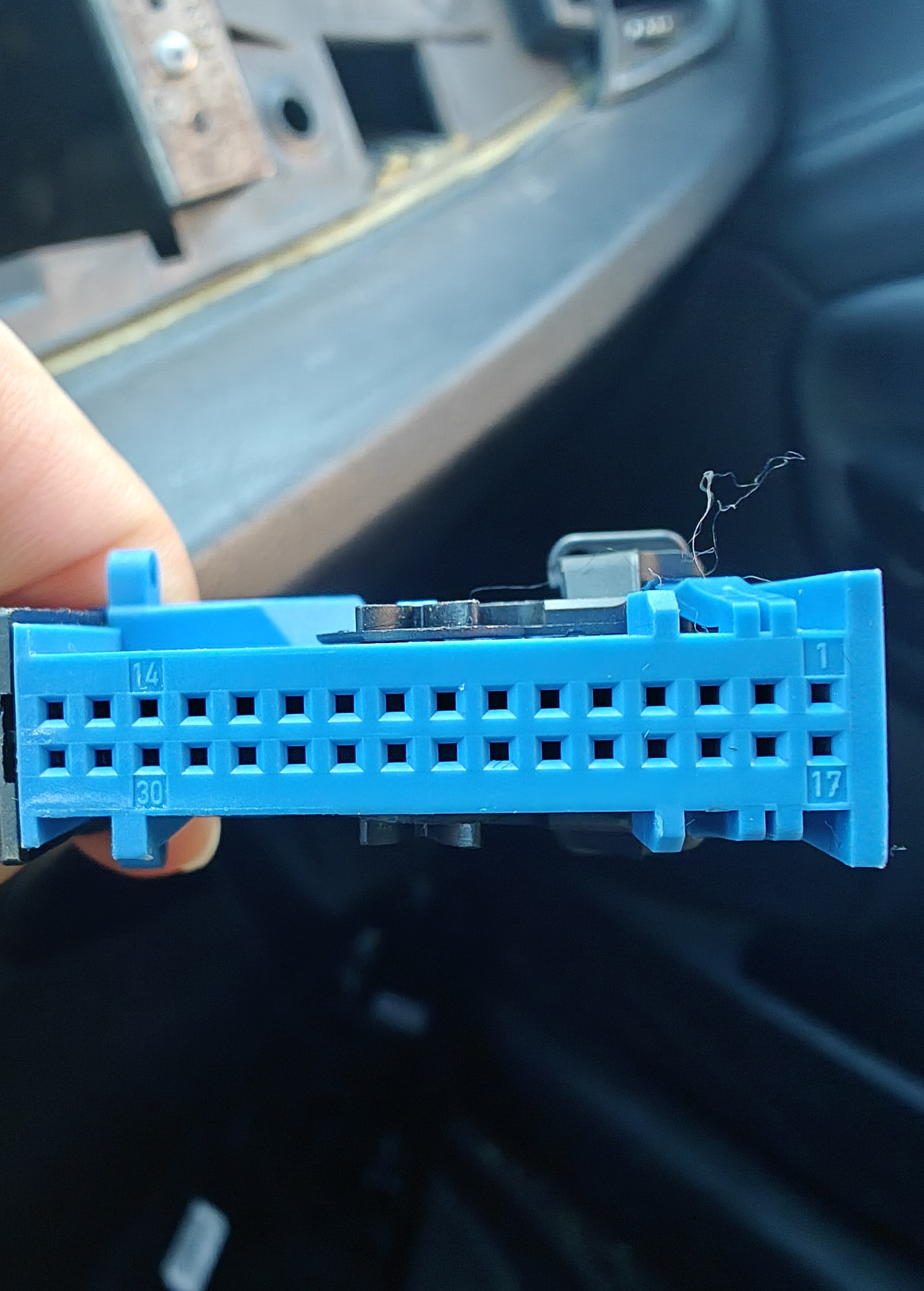
| Step | Pin | Label | Wire to |
|---|---|---|---|
| 1 | 8 | MIC TIP (mic +) | Joint A of the mic circuit: 2 kΩ ‖ 1 kΩ (about 670 Ω, kept at the car) from Pi pin 2 (5 V), and the 10 µF's + leg. The signal leaves joint B for the mic plug's tip |
| 1 | 24 | MIC GND (mic −) | Joint G, the ground joint |
| 2 | 5 | AUD L | Audio plug tip |
| 2 | 22 | AUD R | Audio plug ring (middle) |
| 2 | 21 | AUD GND | Audio plug sleeve. The plug goes in the sound card's headphone jack |
| 3 | 30 | CAN-H | MCP2515 screw terminal H |
| 3 | 14 | CAN-L | MCP2515 screw terminal L |
| 3 | 15 | GND | Joint G, which also carries the Pi's ground (pin 6). Step 5 adds a second wire here, to the board's K1 (crank hold-up, then buck IN−) |
| 4 | 32 | IGNITION | The ignition wake: its 100 kΩ to the PN2222 base. 12 V in MAR, never onto a Pi pin |
| 5 | 16 | +12V PERM | The board's I10: diode and 2200 µF (crank hold-up), then buck IN+. F36 out while wiring it |
| – | 4 | GND | Nothing: a spare. It is the glovebox USB socket's ground and not proven to reach chassis, so every return stays on 15 |
The pin map
Corroborated by two independent sources: a German Alfa 159/Brera thread documenting the M162 module's connector, and an Italian ClubAlfa thread about fitting Blue&Me to a Giulietta specifically. They agree with each other and with the numbers this project already used.
| Pins | Function | Needed for |
|---|---|---|
| 30 / 14 | CAN-H / CAN-L — "CAN alta" / "CAN bassa" | Step 7, the tap |
| 15 | Ground | Step 7, the tap |
| 16 / 32 | 12 V permanent / 12 V ignition | Step 15 only. Stay off these until then. |
| 5 / 22 / 21 | Audio left / right / ground | Step 14 |
| 7 / 23 / 25 | Audio+ / Audio− / MUTE, to the radio | Possibly step 14 |
| 8 / 24 | Microphone, from the headliner. Amplified; needs its own 5–8 V supply | Step 14, calls |
| 3 / 19 / 20 / 4 / 31 | USB D+ / D− / VCC / ground / shield, to the car's USB socket | Not used. The module fed VCC, so the socket probably has no power while it is out (unverified) |
Why the layout can be trusted even though the photo is at an angle.
The housing is reported as TE/AMP 968265-1, which TE lists as 32
positions in two rows at 2.54 mm. The mating face in the
photograph shows two rows. And the functions pair up exactly as two rows of
sixteen would predict: 3/19 is the USB differential pair, 4/20 its power pair,
8/24 the microphone pair, 14/30 the CAN pair, 16/32 the two 12 V feeds. Every
pair lands in one column. Three independent lines of evidence agreeing is why
this is drawn rather than guessed.
If you want a clean tap rather than probing, the mating parts are reported as
housing 929053-2 and contacts 144969-1.
Column 16 carries both 12 V feeds and sits directly beside the ground you want in column 15. One cavity across is the difference between a working tap and shorting a permanent battery feed.
So identify 16 and 32 before you go looking for 30, 14 and 15. Meter against chassis with the key in MAR: those two sit at battery voltage and nothing else on this connector should. Once you know where they are, count away from them.
Where each wire actually lands
| Car side | Blue&Me pin | Goes to |
|---|---|---|
| CAN-H | 30 | Screw terminal H on the MCP2515 module |
| CAN-L | 14 | Screw terminal L on the MCP2515 module |
| GND | 15 | Not the screw block — it is 2-way, H and L only. Straight to a spare ground pin on the Pi header: 6 on this build (or 9, 14, 20, 25, 30, 34, 39 — all the same net) |
The ground connection is required. On a battery bank, the Pi's ground is separate from the car's. CAN is differential, but the transceiver's input voltages must still stay within a range referenced to the car's ground. I therefore connected the two grounds. Without that connection, messages may be read incorrectly or not at all.
Any free ground pin will do: they are all one net. On this build the car ground is on pin 6, and the module's own ground on pin 39.
30 / 14 / 15 come from fmntf's write-up of the Doblò 263. On my car
they are right: every capture since 2026-09-13 was taken there, with zero bus
errors, and the connector carries all of B-CAN, the diagnostics
(18DA…) included. The OBD socket carries body traffic only, with
no diagnostics at all, so captures from the two taps are never compared.
The cost of being wrong is low and the failure is quiet: candump shows nothing. The tap is listen-only, the CAN controller cannot transmit, and swapping CAN-H and CAN-L is harmless. What is not harmless is touching pins 16 and 32, which are the 12 V feeds. Identify those first and stay off them.
If you have a meter and the car is asleep, a CAN pair reads roughly 60 Ω between the two lines — two 120 Ω terminators in parallel — and each line reads open to chassis. That is a useful confirmation when it appears, but B-CAN is a low-speed bus and may be terminated differently, so a reading that is not 60 Ω does not prove you have the wrong pins.
Then listen
candump -e can0,#FFFFFFFF # errors and data, everythingTurn the key to MAR. Frames should appear.
Step 10 diffs capture H against capture E, and two captures taken at different points on the bus are not comparable — the diff would mix "frames the Body Computer now expects" with "frames visible somewhere else".
The OBD2 socket, and why the Pi does not use it
The body B-CAN is on OBD2 pins 1 (CAN-H) and 9 (CAN-L), with
ground from pin 4 or 5. It was measured on my car on 2026-09-21 at 122 frames/s
carrying the familiar IDs (capture M), and the pinout was confirmed on the car.
An earlier version of this guide guessed pins 3 / 11, which was wrong.
It is a valid tap for body traffic, but it cannot hear diagnostics.
Capture N contains no 18DA… frames at all across a PROXI alignment, a
fault-code read and a fault-code clear. So any alignment work needs the Pi on
the Blue&Me connector, and the tablet's adapter needs an OBD2 Y-splitter if it
is to share the socket. Captures M and N are the only ones tapped here; do not
diff them against the connector-tapped captures.
If you see nothing
- Is the car awake? Key to MAR, or open a door.
- Swap CAN-H and CAN-L. Harmless to try.
- Is the ground wire connected? Without it the bus reads as nothing.
ip -details -statistics link show can0— a risingbus-errorcount means the bitrate or oscillator is wrong; a flat zero with no frames means you are not electrically connected.- Re-check the crystal marking against what you passed to
install.sh.
candump shows a stream of frames when the key is in MAR.
Step 8 — Capture A: 11-bit or 29-bit?
Start recording with the key out, then turn to MAR and wait 60 seconds.
I waited for the capture tool to say it was recording before turning the key. It takes about four seconds to start on a Zero W, and the PROXI challenge arrives in the first few seconds after the network wakes. Turning the key straight after Enter can miss the very message capture A is meant to catch. The same timing matters for the recordings below.
mkdir -p ~/captures
TAP="Blue&Me connector 30/14/15"    # the same tap point for every capture

blueandme-capture --scenario A --out ~/captures/A-ignition-on.log \
                  --tap-point "$TAP" --duration 90
Read the last lines of the output:
ID widths seen: {'29-bit': 4127} <- the answerCheck the identifier width. The expected value is 29-bit. The alfa-blue-me author reported it for the Giulietta, and I confirmed it on mine. A recording showing 11-bit is a different bus; the messages in this guide do not apply. The difference needs to be understood before continuing.
blueandme-decode ~/captures/A-ignition-on.log --profile doblo263 --summaryThe Doblò profile is the structural template. Expect some IDs to match by
luck and most not to — what matters is whether the topic<<16|node
shape holds: do the IDs cluster into a small set of 0x40xx low halves?
You know the identifier width and you have the node list.
On my car (2026-09-13): 29-bit.
Capture A: 4157 of 4157 frames 29-bit, zero bus errors. The IDs are
topic<<16 | node, as on the Doblò. Nodes: 4000 Body
Computer, 4003 cluster, 4005 radio, and 4001 4002 4006
400A 4018 401A; Blue&Me is 4021.
Step 9 — The rest of the captures
Each is one recording. Take your time; the diffs are only as good as these.
# B — key MAR -> OFF, start recording first
blueandme-capture --scenario B --out ~/captures/B-ignition-off.log \
   --tap-point "$TAP" --duration 90

# E — baseline: key in MAR, engine off, touch nothing at all
blueandme-capture --scenario E --out ~/captures/E-baseline.log \
   --tap-point "$TAP" --duration 180

# C — one button at a time, 3 presses each, 2 seconds between
blueandme-capture --scenario C --out ~/captures/C-buttons.log \
   --tap-point "$TAP" --duration 180 \
   --label "vol+ x3, vol- x3, next x3, prev x3, src x3, mute x3, menu x3"

# F — radio: change source, volume up/down, mute
blueandme-capture --scenario F --out ~/captures/F-radio.log \
   --tap-point "$TAP" --duration 120 \
   --label "FM, volume, mute, source cycling"
Then find the button frame:
blueandme-diff ~/captures/E-baseline.log ~/captures/C-buttons.log --by bitsLook for an ID whose payload returns to all-zero between presses and whose
volatile bits form a clean bitmask. Compare against the masks both reference
platforms share: 0x8000 vol+, 0x4000 vol−,
0x2000 mute, 0x0400 source, 0x0080 menu,
0x0040 windows.
Four captures on disk plus a button-frame candidate.
On my car (2026-09-13).
Captures A, B, E, C and F are on disk. The wheel frame is 06354000,
from the Body Computer: the Doblò's own ID, with the same masks, plus next
1000 and prev 0800. It repeats at 2 Hz, with an extra frame
on every change. Capture C holds short presses only.
Step 10 — Capture H: re-align PROXI with Blue&Me
It is reversible: align back without Blue&Me and the blinking stops.
Using your OBD2 adapter and ECU software, run PROXI alignment with Blue&Me present in the Body Computer's configuration. The module is still physically absent, so the Body Computer will look for a node that never answers.
The Pi is tapped at the Blue&Me connector, so the OBD2 socket is free for the tablet and both can be connected at once. Start the capture first, then run the alignment inside it.
blueandme-capture --scenario H --out ~/captures/H-proxi-with-bm.log \
   --tap-point "$TAP" --duration 180
blueandme-diff ~/captures/E-baseline.log ~/captures/H-proxi-with-bm.log
If $TAP differs between E and H the diff is meaningless — check the
two .meta.json sidecars agree before trusting it.
The H − E comparison showed the messages the Body Computer expects from Blue&Me: the PROXI challenge, its retries and status queries to the missing node. I used this comparison in place of a working original module's recording; my broken module could not provide a working example.
While you are in the ECU software, also check:
- whether the radio has its own Blue&Me / media-source configuration item (if the radio needs it too, no amount of CAN will help)
- whether the Blue&Me node's stored PROXI value is readable (the fallback, should the nodes not share one value)
A non-empty H − E diff, and you have seen what the ECU software shows for the radio.
On my car (2026-09-21): PROXI is solved.
About a second after the network wakes, the Body Computer sends
1E114000#. Nodes 400A 4003 401A answer within milliseconds
with the same six-byte value: the value is shared. A node that
stays silent gets three retries, and a mismatch is what makes the odometer blink.
Note the six bytes your own car's nodes answer with. In a capture
they are the frames 1E11400A, 1E114003 and
1E11401A right after 1E114000#. That is your PROXI value;
it goes into the Pi's configuration in step 12.
The blink was fixed in the Body Computer itself. Its PROXI record
2023 needs group 6F 04 00 05 at 02,
"telematic present"; experiments/node61/write_bc_record.py wrote it,
with an undo file kept. That script changes the car's configuration: read
experiments/README.md in the repository before you use it, and read
the record out and keep it first. During alignment the Pi also answered diagnostics as the
telematic unit, 61, the way the cluster 60 does. Since then
the car expects a Blue&Me node, so the blink comes back whenever the Pi is
absent. The radio needs nothing of its own (step 12).
04 Profile and first transmission steps 11–12
Step 11 — Check the profile against your captures bench
The frames the Pi expects and sends are in
blueandme/protocol/profiles/giulietta940.py, each with the recording of
my car it was seen in: the 29-bit width, the wheel frame and its masks, and every
frame the Blue&Me node exchanges with the car. Received: the Body Computer's
status poll and PROXI challenge, and the radio's media request. Sent: the status,
the PROXI answer, the watchdog, track time, the audio channel and the track text.
I compared the profile with my recordings before allowing any transmission. The commands below print the profile and decode the captures. This comparison needs to be repeated for the car being fitted:
blueandme-protocol-map --profile giulietta940
blueandme-decode ~/captures/A-ignition-on.log --summary
blueandme-decode ~/captures/C-buttons.log --summary
The recordings must contain the status poll 0E094000, the PROXI challenge 1E114000 and the wheel frame 06354000. The wheel bits must also match the buttons pressed in capture C. If either check fails, the car differs from mine: this is the point to stop, with transmission still disabled.
Your captures show the frames the profile names, and blueandme-giulietta --check passes.
How fast the Pi answers. With my car's traffic replayed to the
application on a virtual bus (experiments/node4021/app_replay.sh): PROXI
answered in 3.3 ms, the radio's request in 3.1 ms (its window is about
100 ms), all 62 status polls in a median 3.5 ms. The application reads only
the profile's frames; the kernel filters the rest, or the Zero W answers the radio
too late.
Step 12 — First transmission, one frame at a time
If anything unexpected happens — warning lights, a module dropping out, the radio behaving oddly — go back to listen-only immediately and write down what you saw.
First, two things. The original module is unplugged: two nodes
with the same address contend. And your PROXI value from step 10 is in the Pi's
configuration, /etc/blueandme/config.yaml, under can:, as
12 hex digits in quotes. While it is empty the Pi does not answer the PROXI question.
On my own Pi the value is built into the copy it runs. This setting exists only in the
published code: tests cover it, but I have not yet run it in the car.
can:
  proxi_value: "............"    # your car's six bytes, 12 hex digits, in quotes
blueandme-giulietta --config /etc/blueandme/config.yaml --checkThen one command takes the controller out of listen-only and lets the application
send the frames named, all six by default; off reverses both:
sudo ~/giulietta-blue-me/tx.sh on                        # all six node frames
sudo ~/giulietta-blue-me/tx.sh on bm_status_response     # or one at a time
sudo ~/giulietta-blue-me/tx.sh status
journalctl -fu blueandme-giulietta             # every transmitted frame is logged
sudo ~/giulietta-blue-me/tx.sh off                       # back to listen-only
My car accepted all six, so on with all of them is the normal case.
One at a time, in this order, if anything looks wrong:
| # | Frame | Question it answers |
|---|---|---|
| 1 | bm_status_response | Does the Body Computer stop treating the node as missing? |
| 2 | bm_proxi_response | Does the odometer stop blinking? |
| 3 | bm_watchdog | Any change? |
| 4 | bm_audio_channel | Does the radio now offer, and accept, the Blue&Me source? |
| 5 | bm_track_time, bm_text_message | Does text appear on the displays? |
At item 2, I had a replacement the car accepted. Item 4 opened the radio's audio input. Only then was it worth connecting the sound card to the car.
How the radio and the Pi agree on the source. The radio asks with
06314005#0C…, the Pi answers 06314021#…84 within 3–5 ms,
the display frame 0A114005 turns to E2, and the radio
confirms with 04…10. Leaving is 24, answered
…80. The Pi answers only when asked: …84 sent unprompted was
ignored. Sometimes the radio skips its 0C; pressing MEDIA again works.
The script from before the application. The first transmissions on
my car came from a script run by hand,
experiments/node4021/node4021_full.py. It remains for tests the
application does not have. Copy it and car_tx.sh from that folder to the
Pi's home; car_tx.sh lets can0 transmit for the run, puts
back the mode it found on any exit, and refuses on a quiet bus:
sudo ~/car_tx.sh 1800 --value <your PROXI value> --text.
Once the car expects the module, the Pi stays tx.sh on, across reboots
and reinstalls: without its PROXI answer the odometer blinks. Listen-only
(tx.sh off) only
while CAN leads are newly connected, until ip -s -d link show can0 shows
frames arriving and no errors. preflight.sh
checks that the controller and the app agree, and it and car_tx.sh put
back whatever mode they found (car_tx.sh stops the app for its run if
the app itself transmits, and starts it again after). tx.sh status shows
the controller and the app.
Emergency stop
sudo ~/giulietta-blue-me/tx.sh off
# or, if that script is not there:
sudo sed -i 's/^  mode:.*/  mode: listen-only/' /etc/blueandme/config.yaml
sudo systemctl restart blueandme-giulietta
Physically: pull CAN-H and CAN-L.
05 Audio and permanent install steps 13–15
Step 13 — Sound card bench
Do this in parallel with the CAN work; it needs no car. The Pi Zero W has no analog audio at all, and the car is analog on both sides: the radio takes Blue&Me audio on connector pins 5 / 22 / 21, and the microphone arrives on pins 8 / 24. A USB sound card handles both directions. Audio cannot travel over CAN: B-CAN runs at 50 kbit/s, and CD-quality stereo needs 1.4 Mbit/s.
The card is a Ugreen USB-A adapter built on a C-Media HS-100B. It plugs into the
Zero W's micro-USB data port — the one marked USB,
not PWR — through an OTG adapter.
- Ugreen USB sound card C-Media HS-100B
- Micro-USB OTG adapter micro-B plug to USB-A socket
- Headphones for the output test
- A headset with a microphone for the recording test
- Multimeter for the sleeve check
| HS-100B | |
|---|---|
| USB ID | 0d8c:0014 (C-Media), USB 1.1 full speed, 100 mA |
| ALSA name | Device, so plughw:CARD=Device |
| Output | stereo, headphone jack. Speaker volume −37 to 0 dB |
| Input | mono microphone jack. Mic Capture −12 to +23 dB; Auto Gain Control on by default; install.sh switches it off, because calls need fixed mic gain |
| Sample rates | 48 and 44.1 kHz only. Calls arrive at 8 or 16 kHz, so the Pi resamples them |
Mic Playback must stay off. It loops the mic input
straight to the output. It is off by default, but in the car it would send the cabin
mic into the radio. blueandme-status warns if it is on.
The headphone sleeve is a true ground. The HS-100B can run a "cap-less" output, in which the sleeve sits at a bias voltage instead of ground. This card does not: with it powered, the sleeve reads 0 V against the metal shell of its USB plug. Re-check that if the card is ever replaced, because a biased sleeve must never touch pin 21.
The mic jack carries about 3 V of bias, open circuit, for plain electret mics. That is too weak for the car's amplified mic, which must never be wired straight to it.
On a PC first
lsusblists the card with vendor ID0d8c. Then meter the headphone sleeve against the USB plug's shell: 0 V.On the Pi: find the card
Plug it in through the OTG adapter.
aplay -landarecord -lmust both list it, ascard N: Device [USB Audio Device].Play and record
A tone into headphones, then five seconds from the headset mic, played back.
speaker-test -D plughw:CARD=Device -c 2 -t sine -f 440 -l 1
arecord -D plughw:CARD=Device -f S16_LE -r 48000 -c 1 -d 5 /tmp/mic.wav
aplay -D plughw:CARD=Device /tmp/mic.wav
install.sh makes the card the Pi's default sound device, by its name
Device. It also sets up Bluetooth for both music and calls:
| Service | Does |
|---|---|
bluealsa | music sink and the hands-free side of calls (-p a2dp-sink -p hfp-hf), in bluez-alsa 4.3.1 built with mSBC for wideband calls |
bluealsa-aplay | plays music to the card |
blueandme-sco-route | at boot, tells the Zero W's Bluetooth chip to carry call audio over HCI; without it, calls are silent |
blueandme-sco-aplay | plays the caller to the card, with a 150 ms buffer |
blueandme-sco-uplink | sends the card's mic to the phone. It holds the call channel open for as long as the phone is connected, and it never lets stale mic audio build up into delay |
blueandme-bt-reconnect | after boot, calls the paired phone until it connects. My phone reconnected by itself only when its own Bluetooth came on, not to a kit that starts after it |
Calls are wideband. Debian's bluez-alsa (4.0) carries calls
only at 8 kHz. install.sh puts bluez-alsa 4.3.1 built with mSBC
into /usr/local, from the prebuilt package in packages/
or by compiling it, and swaps it over Debian's files with
dpkg-divert. The phone then picks mSBC, 16 kHz, on the Zero W's
own Bluetooth chip: on the bench quiet words came through that 8 kHz lost,
and the few damaged packets (about three in 75 s) were concealed.
sudo ./install.sh --no-wideband puts Debian's files back.
Pair the phone once. Nothing answers pairing requests while the
app is listen-only, so blueandme-pair opens pairing for a while,
trusts the phone that pairs, and closes it again. Pair after install.sh
has run, so that the phone sees the hands-free profile; a phone paired
earlier shows only "Media audio" and has to be forgotten and paired again.
sudo blueandme-pair --seconds 120
# on the phone: pair with "blueandme", then check Phone calls and Media audio are on
I tested music first, then a call, using headphones on the sound card and a mic in its input. Both directions need to work before the audio wiring goes into the car. During a call, journalctl -u blueandme-sco-uplink shows how much microphone audio was sent.
The Pi can also control the call, by AT command over the hands-free link:
blueandme-call answer, blueandme-call hangup, and
blueandme-call calls to list them. Each prints the phone's reply
and succeeds on OK. After a reboot, blueandme-bt-reconnect
brings the phone back without touching it.
Call audio timing
The microphone relay drops audio that has waited more than 120 ms. A plain arecord | aplay pipeline retained four seconds of audio between calls in my test. Keep separate players for music and calls; the shared player did not return to music. Polling Bluetooth state every three seconds, with higher priority for the microphone relay, avoided overloading the single core.
The steering wheel
The installed app turns the wheel's buttons into phone actions, as the Giulietta
Blue&Me manual describes them (604_38_194, p. 9): the action comes when the
button is let go, and a press held over a second is a long press. At each press
it asks the phone which calls exist (AT+CLCC), so it never falls out
of step with it. It sends nothing on CAN, so it works in listen-only too. On the
bench, with buttons injected through the controller's loopback
(sudo ~/press.sh phone 1.5), each of these worked with a real
phone and a real call (2026-09-26). In the car, with the real wheel buttons, I have
since confirmed answering a normal call, hanging up, rejecting a call, muting the mic,
moving a call to the phone and back, and the assistant through the roof microphone.
| Button | Does |
|---|---|
| ☎ phone | Press: answer a ringing call, or take the waiting one. Hold: reject a ringing call (the caller hears busy), or end the call. |
| mute / ESC | In a call, mute and unmute your mic. Otherwise pause and resume the music. Also closes the assistant. |
| voice ("Windows") | Opens the phone's own assistant (AT+BVRA=1), which hears you through the car's mic and answers through the speakers. The phone ends the session itself once it has answered; its page stays on the phone's screen. |
| ▲ ▼ | Next and previous track. Previous restarts the song first, as my phone does. |
| SRC / OK | In a call, move it to the phone's earpiece and back. Outside calls the radio uses it to change source. |
| + / − | Nothing on the Pi: the radio sets its own volume. |
Moving a call to the phone is done at the radio link: the Pi drops the call's
audio link (hcitool, HCI Disconnect), and the phone takes the call to
its earpiece. Bringing it back is AT+BCC, which asks the phone to set
the link up again. Merely stopping the players does not do it with bluez-alsa 4.3.1:
the link stays up and the call goes silent on both sides.
The card is listed for playback and capture, the sleeve reads 0 V, and both the tone and the recorded voice are heard in headphones. Then, with the phone paired, music plays, and a call stays on Bluetooth with both sides heard and no noticeable delay.
Step 14 — Connect audio and the mic to the car
The card's headphone output goes to the Blue&Me connector's audio pins.
| Signal | Blue&Me pin |
|---|---|
| Left | 5 |
| Right | 22 |
| Audio GND | 21 |
The sleeve is a true ground (step 13), so the plug wires straight across: tip is left, to pin 5; ring is right, to pin 22; sleeve to pin 21.
I started with the card's volume low, selected Blue&Me and compared its loudness with FM by ear. The level is adjusted on the Pi with the card's own volume control. The next check is for alternator whine with the engine running. If it is present, a 1:1 audio isolation transformer (a "ground loop isolator") between the card and the car breaks the ground loop.
The microphone. Pins 8 (MIC+) and 24 (MIC−) carry the roof-console microphone, which is amplified. It needs its own 5–8 V supply on its signal wire, and a divider before the card's input, because the card cannot power it and its signal is close to line level. The circuit below does both. On other cars of the group the capsule is a Telicom MIC-98, which its datasheet runs on 5–8 V through 680 Ω; I found no confirmation that the 940 has the same one, so the circuit is built to be measured before it is trusted. During a call the application also tells the radio on CAN that a call is on, with the value the Doblò's module uses.
The mic test board
A breadboard that powers the roof microphone the way the module did, only more gently, and feeds it to the sound card's mic jack through a capacitor (keeps the mic's DC off the card) and two resistors (turn its level down about twelve times). The Pi then measures it, plays it back and carries a test call. The ignition wake of step 15 sits on rows 20–27 of the same breadboard.
| Part | Where | Check |
|---|---|---|
| 2 kΩ | 1c to 5c | meter on Ω, resistor lying on the table (fingers on both legs read low): about 2.0 k |
| 1 kΩ | 1b to 5b, beside the 2 kΩ | about 1.0 k; with both in, row 1 to row 5 reads about 670 Ω. Added at the car (2026-09-27): the mic then sat at 2.37 V instead of 2.16 V |
| 10 µF | + in 5d, − in 8d | long leg is +, the stripe marks −; rated 10 V or more |
| 10 kΩ | 8c to 12c | about 10 k |
| 1 kΩ | 12d to the − strip | about 1.0 k |
| Mic cable | tip in 12e, sleeve in the − strip | an old 3.5 mm cable, cut; its middle wire taped, not connected; plug in the card's MIC jack |
| Car leads | 5e (pin 8), − strip (pins 24 and 15) | dupont jumper wires |
| Ground jumper | − strip to Pi pin 6 | stays on |
| 5 V jumper | 1a to Pi pin 2 | car only: pin 2 is the outer row, first pin from the microSD end |
Home test, done 2026-09-27. With the 5 V jumper off, the audio lead's tip in row 5 and its sleeve in the − strip, the card played a 200 Hz tone into the board: 520 mV at row 5, 41.6 mV at row 12, twelve and a half times less, and the recording through the mic jack was clean (−37.5 dBFS at 0 dB gain, no clipping). At that gain the card's mic input takes about 2 V before it clips, so at the car the recording starts at full gain; if speech comes out quiet, a larger 1 kΩ weakens the reduction.
Measurements from my car
| Measured | Value |
|---|---|
| Pin 8 to pin 24, module out | 6.5 kΩ both ways, open to chassis |
| Fed from 5 V through 2 kΩ | 2.16 V, 1.4 mA |
| Fed through 2 kΩ ‖ 1 kΩ (670 Ω, kept) | 2.37 V, 4.0 mA |
| Divider, 10 kΩ over 1 kΩ | ÷ 12.5 (520 mV in, 41.6 mV out) |
| Silence, card mic gain at +23 dB | −60 dBFS |
| Normal speech | −41 to −55 dBFS, peaks about −25 |
| Loud whistle | peaks −0.8 dBFS, nothing clipped |
To test the roof microphone, I recorded myself talking and whistling towards it, then made a call. I set the relay to add 15 dB before sending the audio to the phone (--gain-db 15 in /etc/blueandme/sco-uplink.env). The person on the other end said it sounded great. That was a much more useful result than a level reading alone.
At the car, in order
I brought the audio and power tests together for the car visit: step 14 and the car work from step 15. The order below keeps the Pi on its power bank until the buck is connected last.
At home, before leaving
- Take the audio lead's wires out of the breadboard (tip out of its row, sleeve out of the − strip): from now on it serves the car's audio pins 5, 22, 21.
- Take the 5 V stand-in jumper out of row 26 (the ignition wake's bench test).
- Leave unconnected for the trip: the mic's 5 V jumper (row 1) and the four car leads (pins 8, 24, 15, 32). The Pi pin 5 wire and the Pi pin 6 ground stay on.
- Buck: solder a red wire to IN+ and a black one to IN−, heat-shrink over the pads, dupont pins on the ends.
- Pack: the Pi with MCP2515 and sound card, the breadboard, power bank, buck with a USB cable to the Pi's PWR port, audio lead, dupont wires, a spare 1 kΩ resistor, multimeter, phone, tablet, a fuse puller.
sudo ~/giulietta-blue-me/preflight.shends inPREFLIGHT PASS, thensudo ~/giulietta-blue-me/tx.sh off: the Pi stays listen-only while the CAN leads go on. Make sure you can reach the Pi at the car, for example over the phone's hotspot.
At the car, first measure (Pi on the power bank)
- Blue&Me module unplugged,
can0still listen-only from home (tx.sh status) while the CAN leads go on. - DC volts, black probe on bare metal: pin 16 about 12 V with the key off and in MAR (permanent); pin 32 0 V off, about 12 V in MAR (ignition).
- Pull F36 (the fuse box below): pin 16 drops to 0 V. Put it back.
- CAN: 30 to H, 14 to L, and the − strip lead to pin 15.
- When
ip -s -d link show can0shows frames arriving and no errors:tx.sh on. The Pi answers the car from here on. Key off and on again: the odometer must not blink.
Then the mic
- Meter only, board not on pins 8 and 24 yet: Ω pin 8 to 24, both ways; pin 8 and pin 24 to bare metal (OL).
- Board leads onto pins 8 and 24; row 1 jumper to Pi pin 2; mic plug in the card's MIC jack.
- DC volts, black on the − strip, red on row 5: clearly under 5 V means the mic is alive. Around 3–4 V is good. Under about 2.5 V, or a recording that distorts on loud whistling, means the 2 kΩ starves it: swap it for 1 kΩ, or put the 1 kΩ beside it (also rows 1 to 5): together about 670 Ω, the datasheet's 680 Ω.
- Record on the Pi while someone whistles and talks towards the roof console, play it back, and if it sounds clean, a test call with the car's mic.
Then audio and the app
- Audio lead onto pins 5 (tip), 22 (middle), 21 (sleeve), plug in the card's headphone jack. Select Blue&Me on the radio: the phone plays (if its music app was recently used), the radio shows the track. Set the level, listen for whine with the engine running (on the power bank that verdict is provisional).
- The wheel: skip, pause, the assistant, answer and reject a call.
Then the ignition (step 15)
- Key off. The row 26 lead onto pin 32.
- Set the Pi to read the ignition on GPIO3 and watch it while the key goes to MAR and back: low in MAR, high off.
Last, the buck (step 15)
Never to the breadboard or a Pi pin. Pull F36 before touching pin 16.
- Key out. Pull F36.
- Buck IN+ (red) onto pin 16; buck IN− (black) into a free hole of the − strip, which reaches pin 15 through its lead (about 0.1 A; the permanent install gives the buck its own ground wire).
- Halt the Pi. When its LED is out, move the Pi's PWR cable from the power bank to the buck's USB socket.
- Refit F36: the Pi boots from the car. Check the supply voltage measured at the Pi; Zero W has no under-voltage detector.
- Start the engine: the Pi must keep running. Mine reset until the converter was replaced; see the diode, the capacitor and the test results in step 15.
- Leaving it: either it stays, running from the car with
tx.sh on, or it comes home: halt it, then pull F36 before unplugging anything.
Music through the car speakers at a sane level, no whine.
Radio controls and display
I matched the card's Speaker level to FM by ear. At −20 dB the music was too quiet; I ended up at 0 dB, the card's maximum, and saved it with alsactl store. Then I listened with the engine running. There was no whine, so I did not need a ground-loop isolator. That first check was on the power bank. With the unit on the car's supply and the engine running there is no whine either.
The radio handles some buttons itself. Outside a call, it reports its mute state over CAN and the Pi pauses the phone until the radio unmutes. I also read the radio's arrow buttons from these messages. Left and right change tracks; up and down adjust Bluetooth volume.
Track text uses the Doblò module's format with its 6-bit character set, as decoded in fiatcan, and
the Giulietta's radio accepts it.
The top line shows the first twelve characters of one text field, so the Pi runs "artist - title"
through it every quarter of a second. The bottom line shows another field, which carries the time as
M:SS. Four character codes of that set show nothing on this radio and none of them is
a bracket, so brackets in a title become *.
Behaviour that depends on the phone. The first press of Previous restarts the current song. If the music app has been idle for a while, the phone ignores Play until I open the app. YouTube Music does not act on fast-forward or rewind commands. A WhatsApp call cannot currently be answered from the wheel: the phone button answers a normal call, but my phone lists a ringing WhatsApp call in a state the application does not treat as incoming.
Step 15 — Permanent install
Once I had verified the audio in step 14, I connected the permanent supply. The Pi runs from the car's permanent 12 V line through fuse F36. It stays in standby for up to 72 hours while parked, ready to answer PROXI when the car wakes. After that it halts. I added further parts as tests showed a need for them.
Why the Pi stays on while parked
The car asks for PROXI about a second after it wakes, which is when it is unlocked, before the key turns. It asks three times within a few seconds. A Pi that has to boot at that moment is far too late: from a cold power-on on 2026-09-27 the firmware took about 3.8 s, the kernel 5.6 s, and the app was on the bus about 53 s after power-on.
A Pi that is already running answers at once: 3.3 ms in the bench replay of the car's traffic (step 11), 8 ms from the supervised script in capture ZB. In every test so far the Pi was running when the car woke, so PROXI was always answered and the odometer never blinked. What the car does when a Pi starts only after it woke, as it would after a parking longer than the hold, has not been tested.
/sbin/init; that only helps a kernel that boots
in about two seconds, and this one takes five and a half. Hence standby.Standby, measured
Measured on the bench with a USB power meter at the Pi's 5 V input
(experiments/standby/). Standby switches off Bluetooth and Wi-Fi, sets
the CPU to its slowest and turns the LED off; the CAN interface stays up, in the
mode tx.sh set, to notice the car waking (on the car: transmitting, so
PROXI is answered at once).
| State | At the Pi | From the battery |
|---|---|---|
| Working: phone connected, music or a call | 1.0–1.07 W | engine running |
| Parked, standby | 0.63 W | about 65 mA, 1.6 Ah a day |
| 72 hours of standby | about 4.7 Ah, some 7 % of a 70 Ah battery | |
| Halted, after the hold | 0.22 W | about 25 mA, 0.6 Ah a day, until F36 is pulled and refitted (or the ignition wake, if fitted) |
For the battery calculation I assumed 12.4 V and a buck converter with 80 % efficiency. The battery's actual capacity needs checking on its label. The halted Pi still draws roughly a third of its running current. Three weeks parked use about 4.7 + 11 Ah, roughly 22 %. If I will be away longer, I pull F36 to disconnect the supply.
Blue&Me is unavailable while the Pi is halted. The radio cannot use the source and PROXI goes unanswered. Removing and refitting F36 restarts the Pi, which is ready in about a minute. If long parking is frequent, the ignition-wake circuit below can be added; turning the key then restarts it.
Waking from standby. blueandme-standby enters standby after a minute of bus silence with the ignition off. It wakes on a CAN message when the car is unlocked, or through the ignition line if connected. In my bench test with a message, music was ready in 3.3 s and calls in 3.7 s. A cold start takes 33.5 and 34.2 s. The service only arms after seeing car traffic, so a bench setup with a silent bus never enters standby.
The install
| Concern | How |
|---|---|
| Power | 12 V→5 V buck, automotive-rated, low idle current, from Blue&Me pin 16 (permanent 12 V) and pin 15 (ground), always on. At the end of the hold the Pi halts (about 25 mA from the battery) until F36 is pulled and refitted, or, with the ignition wake fitted, until key-on. The original 6–32 V USB module was replaced after an unloaded dropout test, by a TECNOIOT 6–24 V to 5 V USB step-down module; the replacement resolved the crank resets (2026-10-01). Keep the converter mounted inside the case a few centimetres from the connector, so the car's own fuse for the Blue&Me feed covers the short lead as it covered the original module's wiring; an inline 2 A fuse only if the leads ever run outside the case. On the bench, from a 12 V adapter, it held the Pi at 4.90–4.92 V from boot through music (0.12–0.32 A), with negligible idle current (original converter, 2026-09-25); that 12 V test did not establish low-input operation. Pulling the car's fuse, F36, is the power cut for long absences. Never feed 12 V to a GPIO pin. |
| PROXI | Answered by the running Pi, because it is in standby rather than off (3.3 ms on the bench). After a parking longer than the hold the Pi is halted until restarted; what the car does with a late answer has not been tested. |
| Mic | The step 14 circuit, soldered, with the values measured at the car, feeding the sound card's mic jack. |
| Ignition sensing | CAN traffic wakes a Pi in standby, with no wire. Only a halted Pi, after a parking longer than the hold, needs the ignition: added only if such parkings turn out to be common; until then, pull the fuse and put it back. The circuit is an NPN transistor and two resistors (PN2222 from a starter kit): pin 32 → 100 kΩ → base, 100 kΩ base to ground, collector to GPIO3 (header pin 5), emitter to ground; a 1N4007 across base and emitter (cathode to base) keeps negative spikes off the base (power.ignition_gpio: 3, ignition_active_low: true). GPIO3 is the one pin that boots a halted Pi when pulled low, and has its own 1.8 kΩ pull-up. No optocoupler: the Pi's ground is the car's ground anyway. |
I have not made the root filesystem read-only yet. The card has survived the power cuts so far, but that does not establish that it is safe from damage.
The ignition wake
Optional: it lets the ignition restart a Pi that has halted after a parking longer than 72 hours; without it, pull F36 and put it back. Three kit parts on rows 20–27 of the mic board's breadboard, sharing its − strip. When the key is in MAR, the transistor pulls Pi pin 5 (GPIO3) to ground, and a halted Pi boots on that.
| Part | Where | Check |
|---|---|---|
| PN2222 | E in 21c, B in 22c, C in 23c | meter on diode (→|): red on one leg, black on each other leg; the leg that reads about 0.6–0.7 V to both is the base (the middle one on a PN2222). With red on the base, the leg reading slightly higher is the emitter. Black on the base: both OL (an NPN). |
| 1N4007 | stripe in 22b, other end in 21b | the stripe goes to the base's row |
| 100 kΩ | 22a to the − strip | about 100 k, measured off the board |
| 100 kΩ | 22d to 26d | about 100 k |
| Jumper | 21a to the − strip | the emitter's ground |
| Wire | 23e to Pi pin 5 | pin 5: the inner row, third pin from the microSD end |
| Wire | 26e to car pin 32 | the ignition line, as measured at the car |
Bench-tested 2026-09-27. The Pi's own 5 V (pin 2) on row 26,
standing in for the ignition, set GPIO3 to 0; without it, 1. A halted Pi booted the
moment it went in (halted 14:38:48, back on the network 14:39:56). That stand-in
comes out afterwards, or the Pi restarts whenever it halts. At the car it only needs
the pin 32 wire and two lines of config (ignition_gpio: 3,
ignition_active_low: true).
12 V to 5 V
The buck module stays off the breadboard: it has its own solder pads and a USB socket, and keeping 12 V off the board keeps it away from the Pi's pins.
| From | To | Note |
|---|---|---|
| Car pin 16 (permanent 12 V) | buck IN+ | behind the car's fuse F36. For good, through the crank hold-up: pin 16 → board I10, board L10 → buck IN+ |
| Car ground | buck IN− | the − strip for the car test. For good: pin 15 → board K1, board L1 → buck IN− |
| Buck USB socket | Pi PWR port | a USB cable; the Pi's other port keeps the sound card |
Soldered, without a breadboard
For the permanent install the mic circuit is soldered, each joint covered with heat-shrink: a breadboard shakes loose in a car. The ignition wake goes onto the perfboard of the next part. Values as kept at the car (2026-09-27): with a 1 kΩ beside the 2 kΩ the mic sat at 2.37 V (2.16 V on the 2 kΩ alone) and recorded clean at full gain, loud whistles included.
- Cut the wires to length. Before soldering, slide a sleeve onto each wire that ends at A, B or G, and one over each part you will join.
- The 2 kΩ and a 1 kΩ side by side, their legs twisted together at both ends (about 670 Ω); one end to the Pi pin 2 wire.
- A: the pair's other end, the capacitor's + leg and the car pin 8 wire, twisted and soldered. The capacitor's − leg to one end of the 10 kΩ.
- B: the 10 kΩ's other end, the second 1 kΩ and the mic plug tip wire.
- G: that 1 kΩ's other end, car pins 24 and 15, the mic plug sleeve and the Pi ground wire.
- Slide each sleeve over its joint or part and shrink it (heat gun, or a lighter held below, not in the flame).
- Meter on Ω before the car: Pi pin 2 wire to car pin 8 wire about 670 Ω; mic tip to ground about 1 k; car pin 8 to ground open.
With the unit built into its case, the person I called heard a low, motor-like noise and not my voice. Back on the bench (2026-10-11) the mic input's noise floor was −34 dBFS at +23 dB gain with nothing on car pin 8. At the car on 2026-09-27, with the roof microphone connected and the cabin quiet, it had been about −60. On the bench it was the same on the power bank and with car pin 8 held to pin 24, and it was gone (−82) with the mic plug out of the card. So it came in through the mic plug, and both causes were grounds.
I had taken the mic plug's sleeve to car pin 24 alone and not to joint G; joined, the floor was −40. And the sound card's own ground stood above the Pi's, 60–80 mV with the mic plug out and 30–38 mV with it in: about 2 Ω in the ground of its USB cable, which I had cut short and soldered to the Pi to fit the case. A short wire soldered from the card's ground to joint G brought that to 4.5 mV with the mic plug in, and the floor to −59 dBFS with pin 8 held to pin 24. That is close to the −60 of 2026-09-27, but it is not the same test: there the microphone was connected, here there was none and the two pins were joined.
Two readings find both, with the power on. Mic plug out: plug tip to car pin 24, about 1 kΩ. Mic plug in: DC millivolts between car pin 21 (the card's ground, through the audio lead) and car pin 24, a few millivolts and steady. Tens of millivolts that hover are the noise itself.
Since both fixes the calls work again, tested in the car with the unit fully installed (2026-10-11). The person I call reports a slight echo. I have not measured it, and I will deal with it later.
Ignition wake and crank hold-up on one perfboard
Both circuits that touch the car's 12 V, on one piece of the kit's perfboard (plated holes, none joined): 10 columns × 24 rows, the size of the 3 × 7 cm board (count yours). The ignition wake takes rows A–G; row H stays empty; the crank hold-up takes rows I–X, most of it the capacitor lying flat. Parts go on top, connections are made underneath with bent leads and solder bridges. With the capacitor lying down the board stands about 21 mm tall.
Crank hold-up and converter fix (2026-10-01). The installed Pi reset during cranking despite an added 2200 µF capacitor. The original converter, advertised for 6–32 V, produced 0 V at a 10 V bench supply even with the Pi disconnected and the supply in constant-voltage mode. Output returned by 11 V; at 12 V supply the multimeter measured 5.09 V output. Replacing the converter resolved the resets. The replacement, a TECNOIOT 6–24 V to 5 V USB step-down module, kept the Pi running down to 5 V at the bench supply; the Pi's rail voltage at that input has not been recorded. Buck IN− was also found disconnected and reconnected before these tests; it needs its own return to pin 15. Pin 16 reaches the buck through a diode, with the fitted 2200 µF capacitor across IN+/IN− after it. Use a capacitor rated at least 35 V; the diode's stripe faces the capacitor. No increase in capacitance is required by the reported fix. The car's crank waveform remains unmeasured; do not assume an advertised 6 V input limit when calculating hold-up time.
| Part | Holes | Check |
|---|---|---|
| PN2222 | E in B3, B in B5, C in B7; flat face toward row C | E, B, C found with the meter first, as in the breadboard table above |
| 100 kΩ | D1 to D5 (base to ground) | about 100 k, measured off the board |
| 100 kΩ | E5 to E9 (from pin 32) | about 100 k |
| 1N4007 | F1 to F5, stripe at F5 | the stripe goes to the base's column |
| Diode | J10 to J6, stripe at J6 | 1N5822 or 1N4007; the stripe toward the capacitor |
| 2200 µF 35 V | + in L6, − in L3; body lying flat over rows M–X | the long lead is +, the stripe on the body marks −. Backwards it can burst |
| Wires | Pi pin 5 B9, Pi ground G1, car pin 32 G9; car pin 16 I10, car pin 15 K1, buck IN+ L10, buck IN− L1 | in from the top, soldered underneath |
| Tracks | B3–B1–G1, B5–F5, B7–B9, E9–G9; I10–J10, J6–K6–L6–L10, K1–L1–L3 | underneath; no other hole joined |
- Transistor first: bend E and C outwards so the legs sit in B3, B5, B7, flat face toward row C. Solder underneath, keeping the three blobs apart.
- The two resistors and the 1N4007, flat on the board, stripe at F5; the crank diode in J10–J6, stripe at J6. Solder, leaving the leads long until the tracks are done.
- The capacitor: bend both leads 90° about 3 mm from the body, + into L6 and − into L3, body lying flat toward row X. Solder, then a line of glue (or a tie through two free holes) holds the body.
- Tracks underneath: lay each long lead along its track and solder it into the next holes; bridge the rest with solder or a bare offcut. Ignition: B3–B1–G1, B5–F5, B7–B9, E9–G9. Crank: I10–J10, J6–K6–L6–L10, K1–L1–L3. Row H and everything else stay apart.
- The seven wires in from the top, soldered underneath.
- Meter on Ω, nothing connected: C to E open both ways; Pi pin 5 wire to Pi ground wire open; car pin 32 wire to B5 about 100 k. Crank side: car pin 16 wire to buck IN− wire must not read near 0 (the capacitor charges from the meter, so the reading climbs); buck IN+ to buck IN− the same; on the diode range, I10 to L10 about 0.3–0.7 V one way, nothing the other. Then a dab of glue over the wire joints.
- At the car, F36 out: wires on, F36 back in. Read GPIO3 while the key goes to
MAR and back (0 in MAR, 1 off). Confirm the Pi stays running through a crank;
the Zero W has no low-voltage detector, so
get_throttled=0x0is not proof of a stable supply. If it resets, measure buck input and Pi 5 V with a scope.
Cranking lowers the supply even while the Pi is running in standby. The original
buck lost its output near 10 V supply on the bench; replacing it resolved the
reported resets. Keep the fitted diode and 2200 µF capacitor, and ensure buck
IN− is wired to pin 15. If resets return, capture the buck input and Pi 5 V
during cranking. The Zero W cannot report supply undervoltage through
vcgencmd get_throttled:
Raspberry Pi documents the Zero-range exclusion.
The Zero W has no real-time clock. Until NTP sets the time, each recording's started_at is the image build date. The phone hotspot provides internet and corrects the clock, but recordings made earlier keep the wrong dates. A DS3231 costing about €2 could solve this; I have not fitted one yet. Used with ignition wake, it needs a separate I2C bus (dtoverlay=i2c-gpio), because wake uses pins 3 and 5.
- I have not completed the long-parking test yet. The battery needs checking after one night and then four days parked. The Pi must halt after 72 hours;
blueandme-standbyshould log the halt and Wi-Fi should stop responding. Refitting F36, or turning the key with ignition wake fitted, must restart the Pi. Working in daily use does not establish that it will avoid draining the battery during a longer stay.
Case and connector fitting
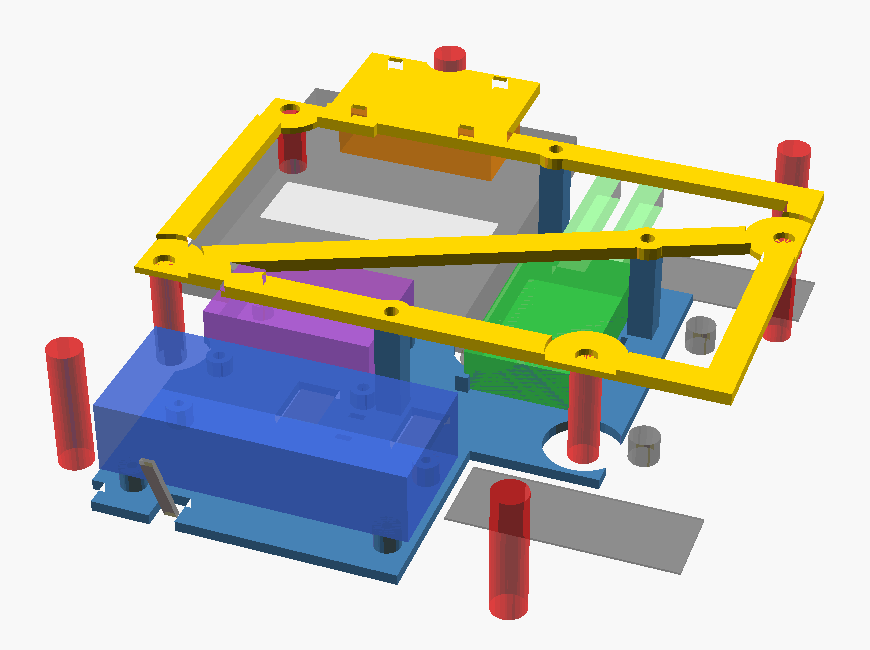
The original case is 150 × 175 × 40 mm, with four M3 mounting bosses. Its PP-TD40 plastic passes Bluetooth. Use PETG or ASA for the printed frame and tray; PLA can soften in a parked car. Check the real cable and plug clearances as well as the model, and secure the parts and wiring before closing the lid.

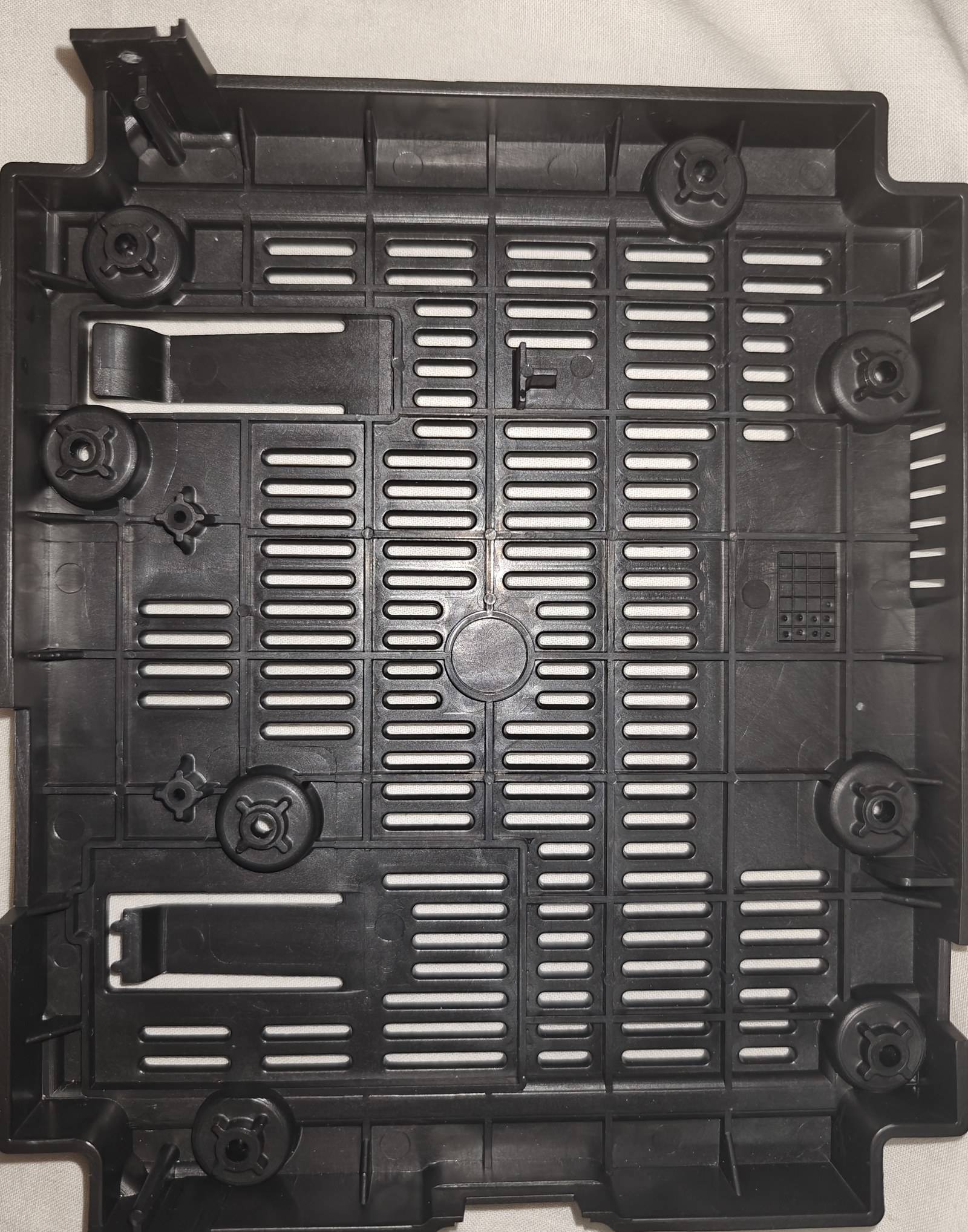
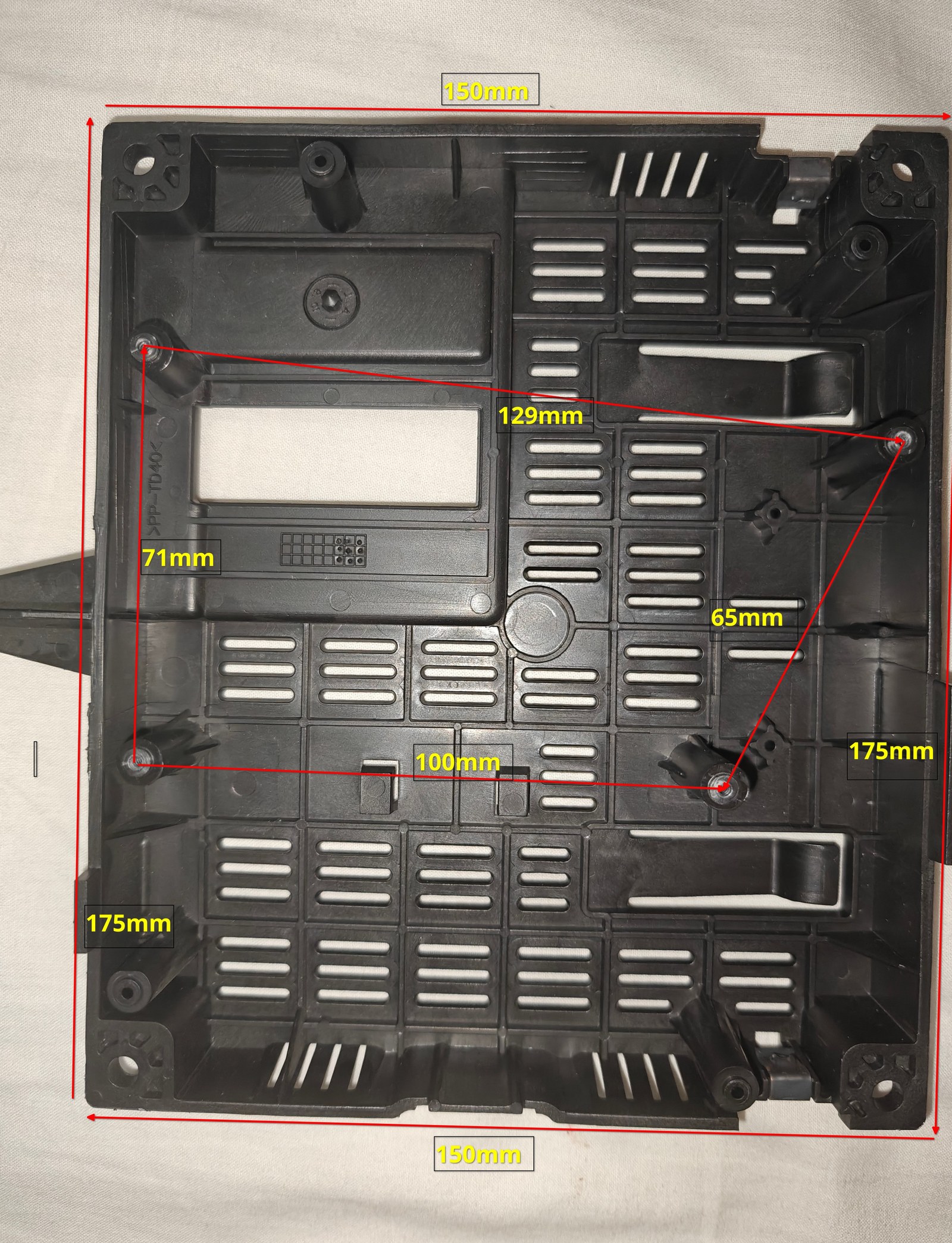
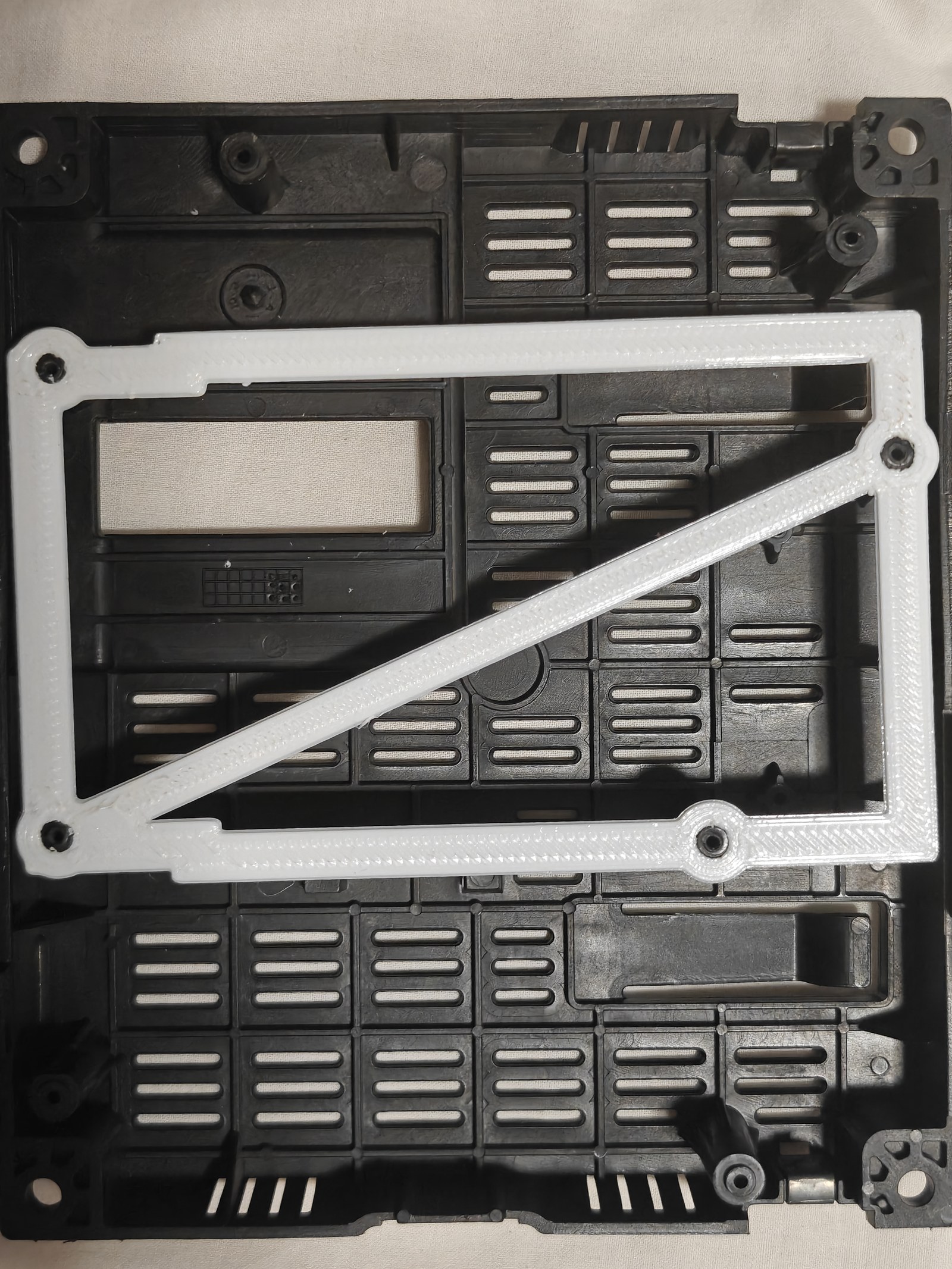
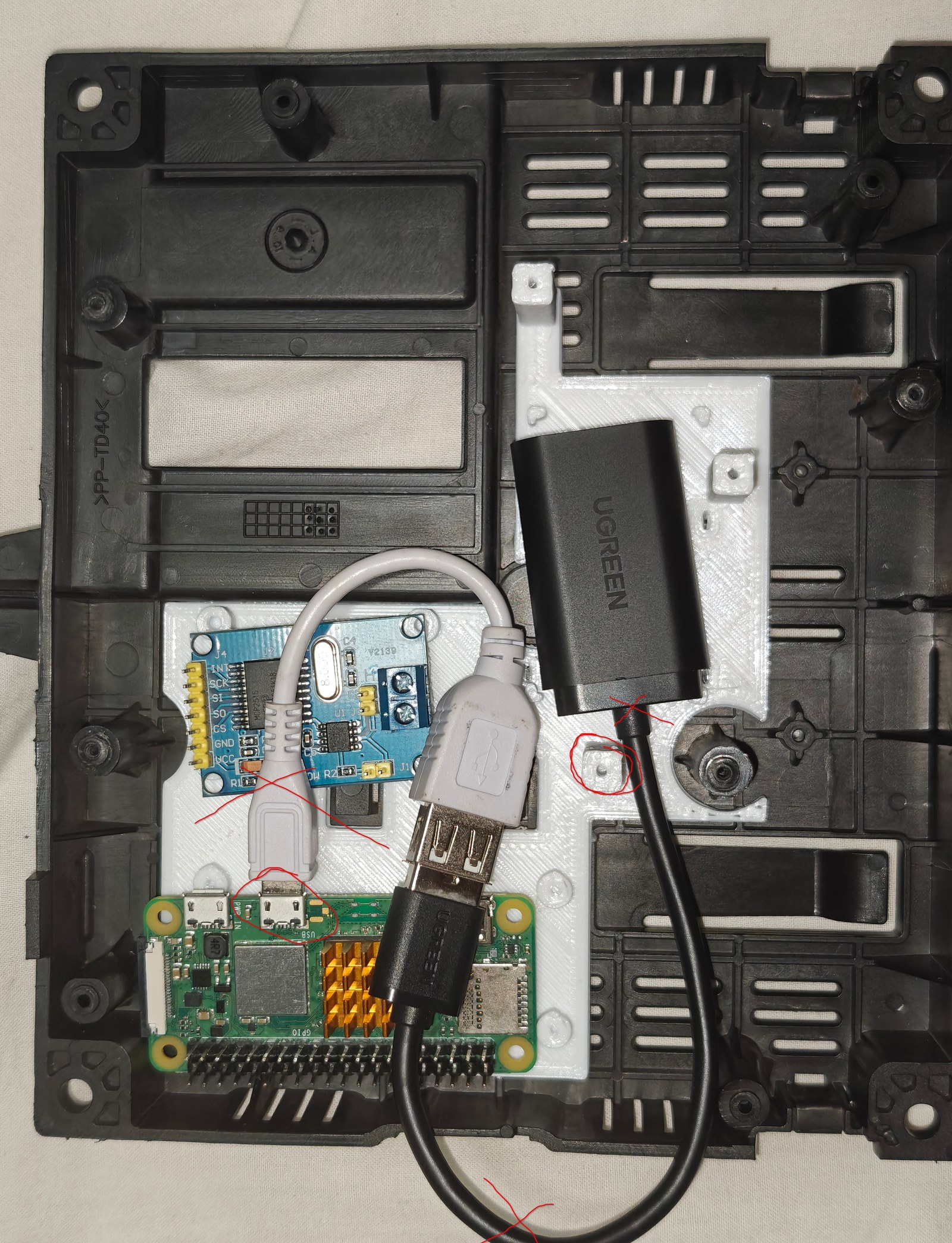
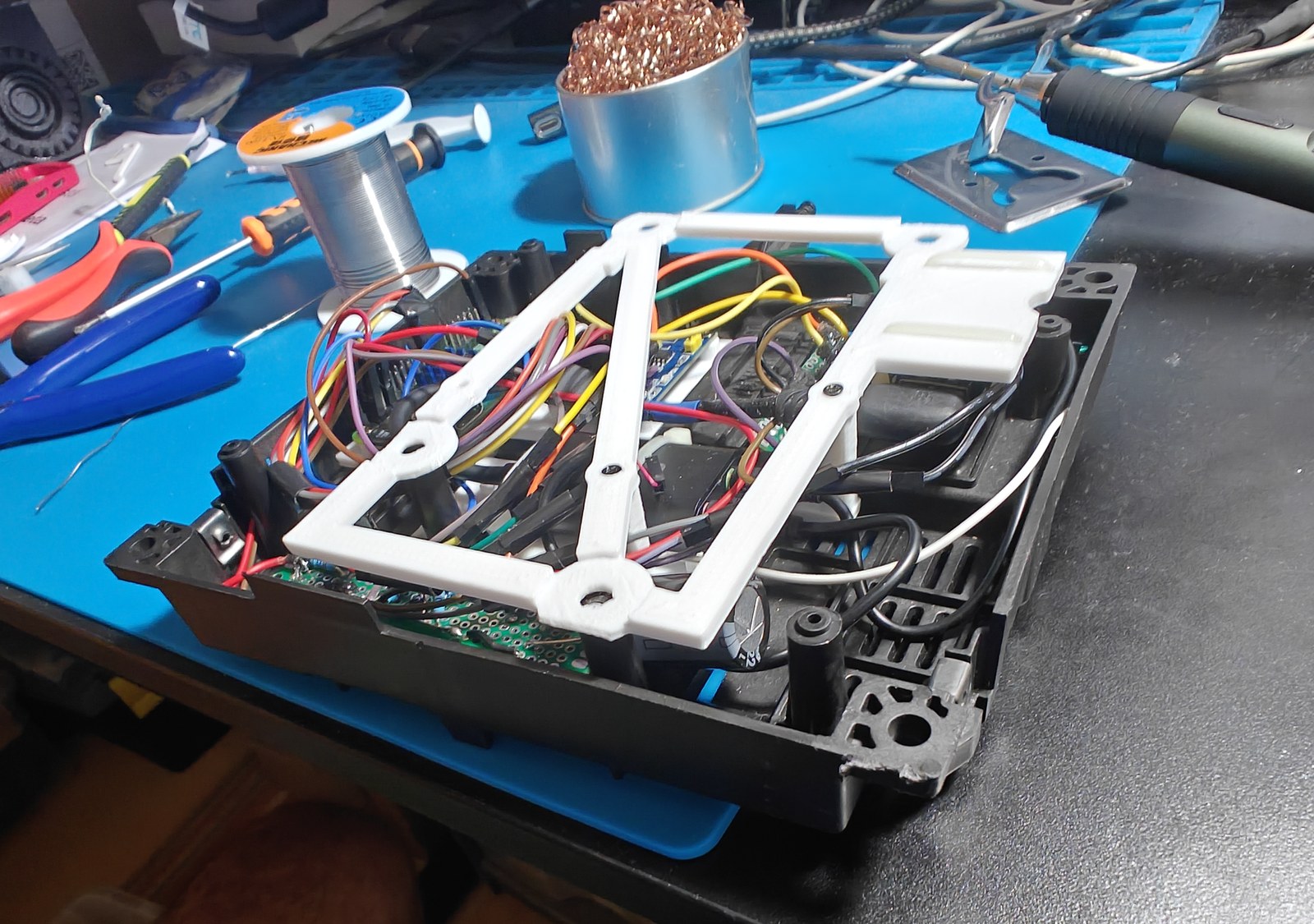
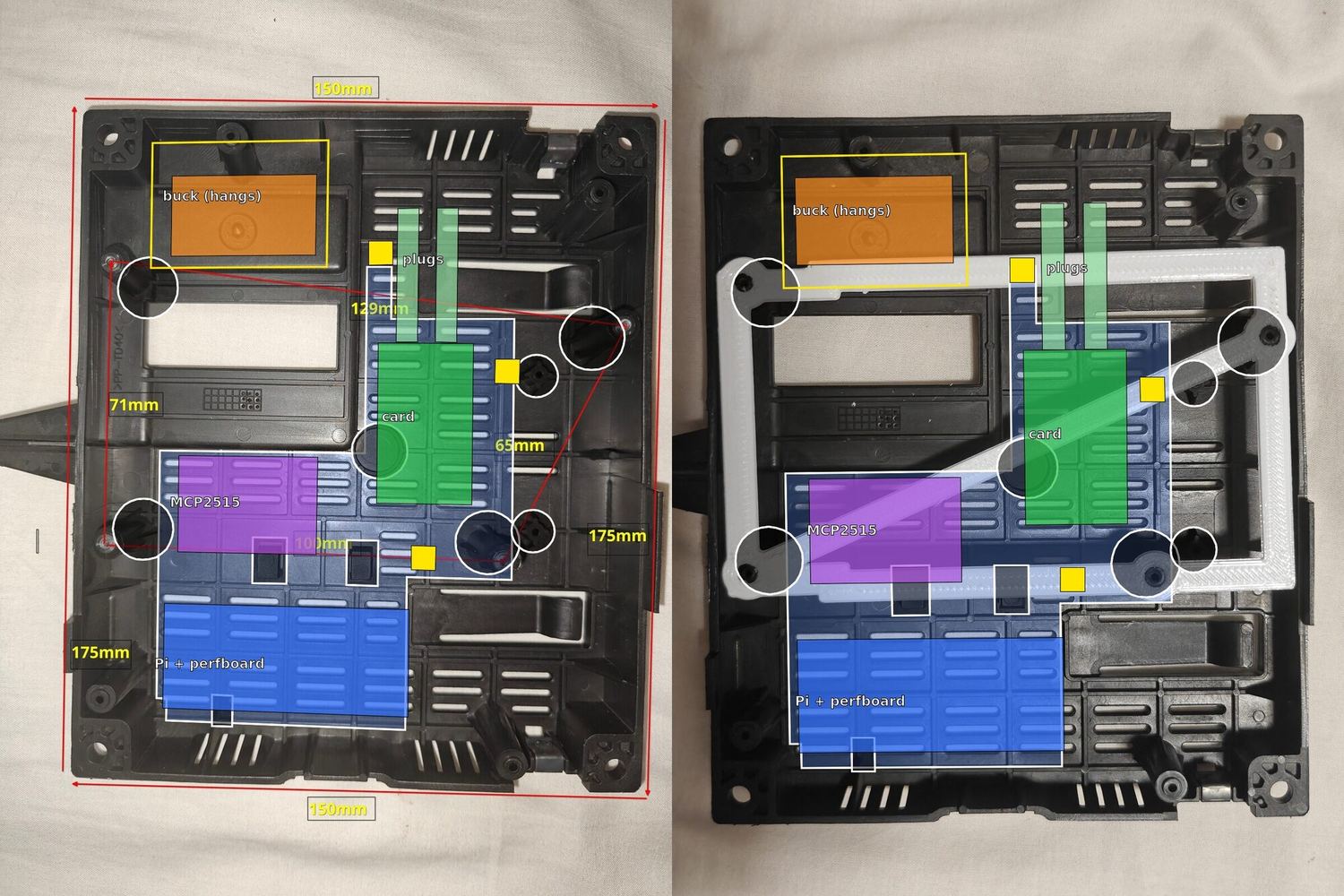
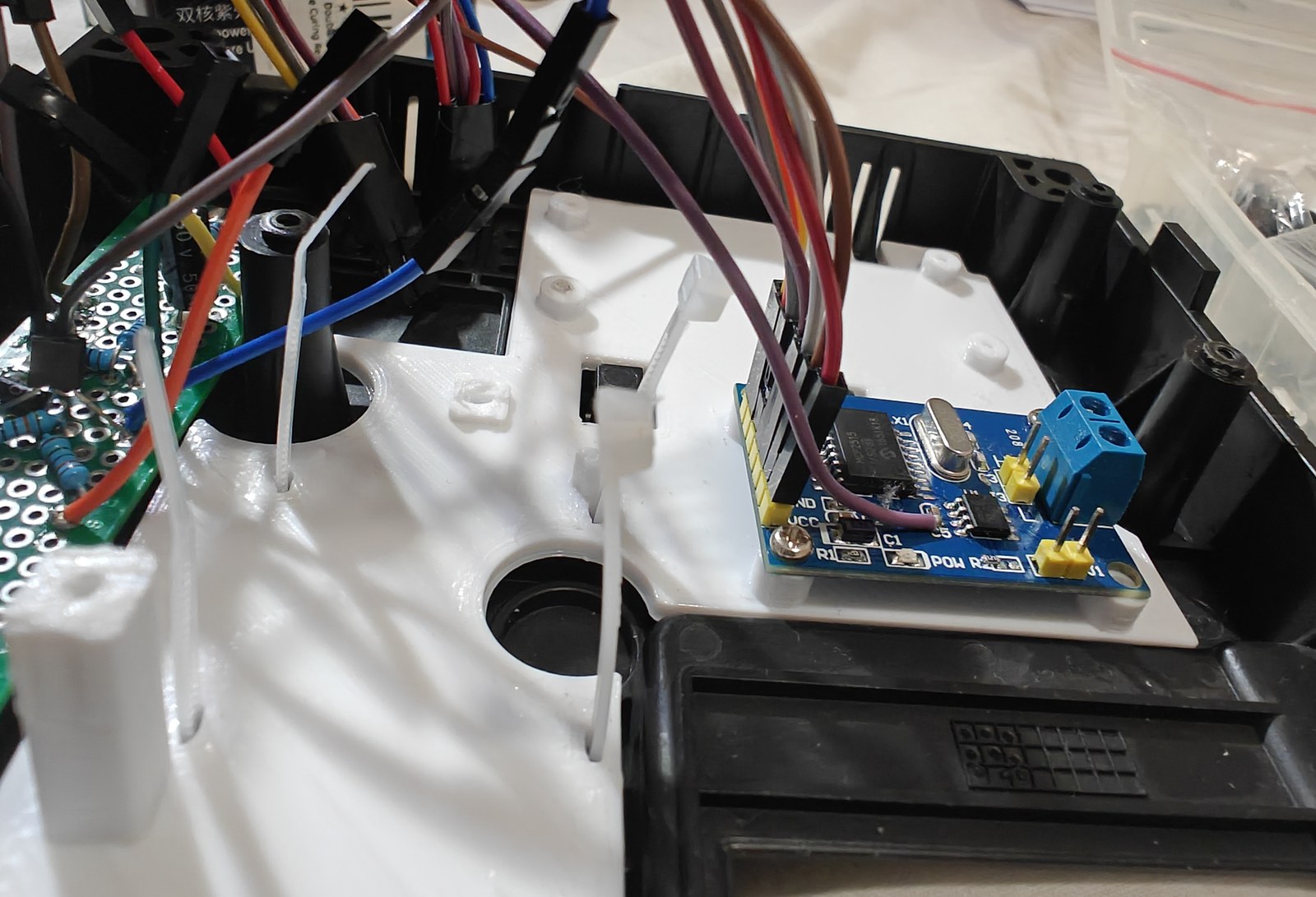
The fix for the adapter: the card's USB cable is cut short and soldered to the test pads on the Pi's
underside. PP1 is 5 V, PP6 ground, PP22 D+ and
PP23 D−. The buck's 5 V goes to header pins 4 and 6.
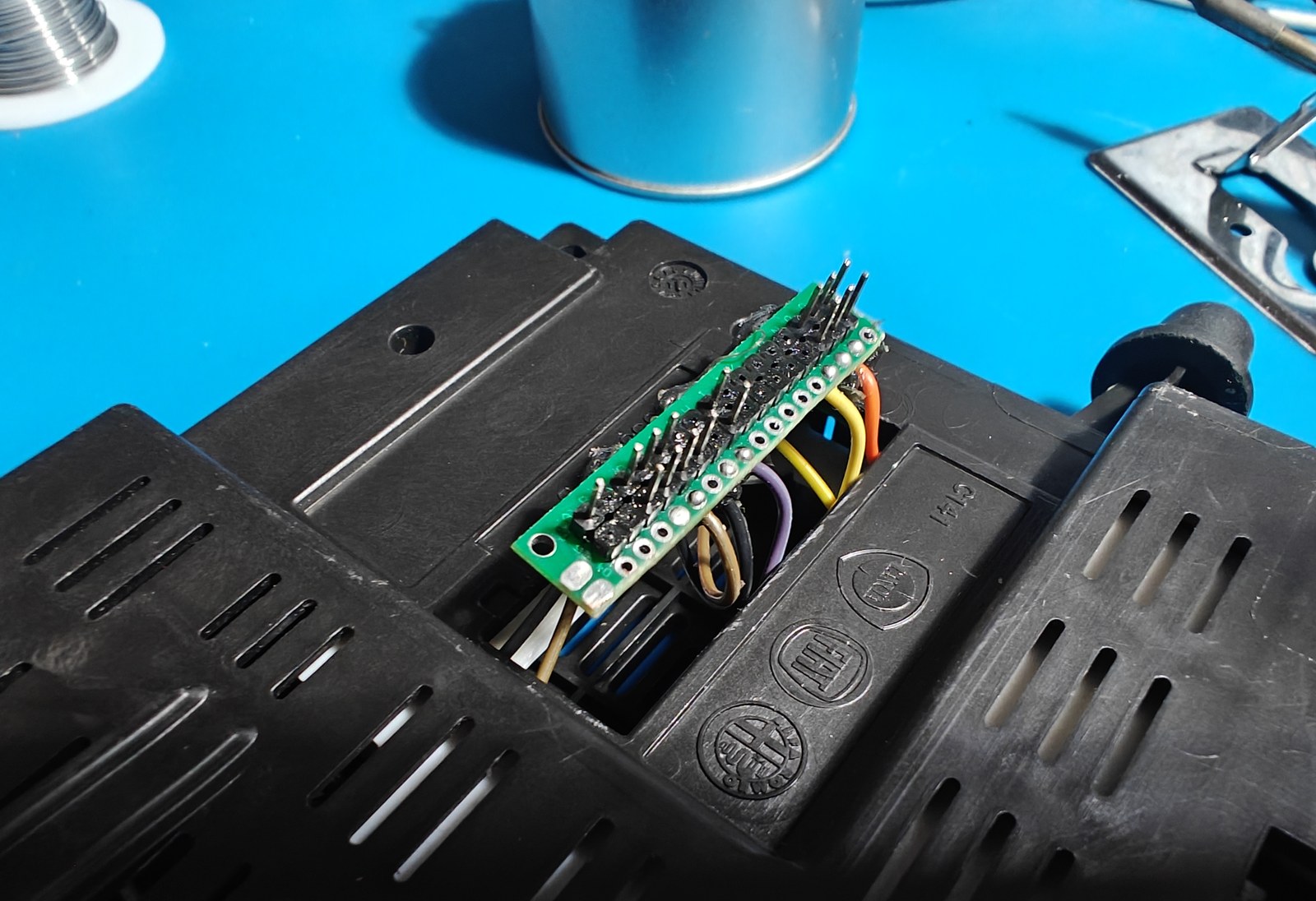
The car connector uses 32 square header pins, 0.64 mm wide and 2.54 mm apart, in perfboard cut to 2 × 16 holes with about a 5 mm border. Only the needed pins have wires. Mark pins 1 and 17 and match them to the plug’s moulded "1" and "17" before mating the connector.
Support and insulate the USB pad wires. If the card disappears with device descriptor read/64, error -71, check the data wires and their solder joints. Do not reset the Zero W’s USB controller by unbinding it: that crashed the kernel in my test and USB stayed unavailable until the power was cut.
Wi-Fi while audio is playing
The Zero W shares one radio between Bluetooth and Wi-Fi. I measured the following packet losses while connected to the phone’s hotspot; switching Wi-Fi off removed the gaps in the music.
| Wi-Fi | Audio packets lost per minute |
|---|---|
| On, idle on the hotspot | 150–320 |
| On, with SSH traffic | 500–1200 |
| Off | 0 |
I added a small service to handle that for me. It checks the Bluetooth audio streams every three seconds and switches Wi-Fi off during music or a call. Thirty seconds after the audio stops, it brings Wi-Fi back. It only restores Wi-Fi if it disabled it itself, so it leaves standby's decision alone.
At the car it goes off two seconds after the music starts. The price: to reach the Pi over SSH, pause the music and wait about 40 seconds.